
Pocket Launcher
Version 1.02 · TONTATA
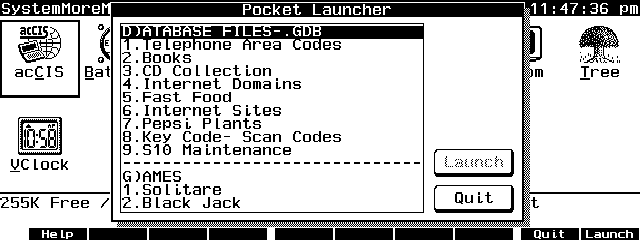
Description
Pocket Launcher is an EXM program to launch an application, execute a DOS command or repeat predefined keystrokes from a configurable menu. Copyrighted freware.
Technical details
- File
lnch102.zip- Size
- 17.7 KB
- Format
- .zip
- Year
- 1996
- Added to S.U.P.E.R.
- 1996-11-11
- Files inside
- 5
- Author
- TONTATA
- Path
anonftp/pub/lnch102.zip
How to install it
What to send to the palmtop saves 14.2 KB
These are the files you need. You can send them from the package contents below.
-
LAUNCHER.EXM→ A:\SOFT aplicación del System Manager 8.2 KB -
LAUNCHER.CFG→ A:\_DAT configuración 4.8 KB
No need to put
README.TXT, LAUNCHER.DOC, SOURCE.ZIP:
they are manuals, source code or supporting material. Read them here and save 14.2 KB on a 1 MB disk.
Steps
- Copy LAUNCHER.EXM to A:\SOFT. It is a System Manager application: register it in App Manager with F2 (Add), giving the full path (for example A:\SOFT\LAUNCHER.EXM).
- The 200LX takes 8 EXM applications at most. Check with F8 (List) in App Manager: an asterisk in the Status column means the quota is full and you will need MoreEXM.
- Copy LAUNCHER.CFG to A:\_DAT, where the 200LX looks for configuration. Open it with Memo and adjust it before use.
- If you edit a configuration file on the palmtop, make sure you leave a newline at the end: some programs swallow the last line without saying a word.
Derived from the package contents and the 200LX conventions. It installs to A: on purpose: C: is a RAM disk and every byte there is memory taken from the system.
It also needs 3
The manual mentions these files, which are in the archive:
The author's instructions
[Installation]
Place launcher.exm in your preferred directory and add it to
MOREEXM.INI with "1," parameter (Suppress ClearScreen). For
example, if you want to use Ctrl+F1 (key code 5e00) as a start
key and if you copied LAUNCHER.EXM TO A:\BIN\, then you should
add a following line to MOREEXM.INI:
      a:\bin\launcher.exm,5e00,1,Launcher
Then reboot the system to make this change to take effect.

Create LAUNCHER.CFG and place it in C:\_DAT or A:\_DAT.
(C:\_DAT is searched first)   LAUNCHER.CFG included in this
package is for reference only.  DO NOT USE IT AS IT IS!  You
should customize it to suit your purpose.  See below for the
format of LAUNCHER.CFG.


[Usage]
When started, LAUNCHER.EXM shows a title list.  Move the
highlight bar to the item you like to select and press {Enter}
to run. {F10}(Launch) key or tabbing to (Launch) button also
works.  {Esc} or {F9}(Quit) key or tabbing to (Quit) button
will exit from the list without launching.

As well as normal arrow key assignment, {Left} and {Right}
will jump to the previous and next separator item.


[Format of LAUNCHER.CFG]
Format of LAUNCHER.CFG file is as follows.

- Data are written as two parts in one line: a title and a
  command string, separated by one or more {Tab} characters.
  Command string is 255 bytes max.
- If a command string begins with "$key,", the string following
  it is treated as key input and directed into the keyboard
  buffer.  See below for Key Notation.
- If a command string begins with "$ADB,", "$PDB,", "$GDB," or
  "$NDB,", then the string following it is regarded as a target
  file name and will be opened after launching Appointments,
  PhoneBook, Database or NoteTaker respectively.
- If a command string begins with "(numerals),", the string
…
Literal excerpt from LAUNCHER.DOC, exactly as it came in the package.
Package contents
Send to my palmtop
The palmtop must be waiting before you press the button, or the transfer will fail. It is the palmtop that announces it is ready, not the other way round.
Your browser cannot talk to the serial port. Direct sending uses the Web Serial API, which only exists in Chrome, Edge and Opera on desktop — not in Firefox, Safari or any mobile browser.
Download the file with the button above and copy it to the palmtop your usual way.