
KeyM
Version 1.02 · CARGO
Description
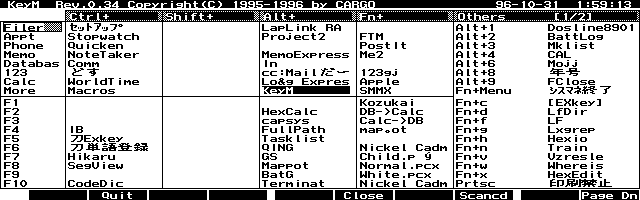
Great EXM for quickly showing all installed EXMs and their keystroke assignments. Also shows closed/open status, allows you to shut programs down and lists all loaded macros. Copyrighted freeware. Click here to check for a more recent version.
Technical details
- File
keym102.lzh- Size
- 12.8 KB
- Format
- .lzh
- Year
- 2007
- Added to S.U.P.E.R.
- 2002-01-29
- Files inside
- 4
- Author
- CARGO
- Path
anonftp/pub/keym102.lzh
How to install it
What to send to the palmtop saves 15.3 KB
These are the files you need. You can send them from the package contents below.
-
KEYM.DAT→ A:\_DAT configuración 512 B -
KEYM.EXM→ A:\SOFT aplicación del System Manager 13.3 KB -
KEYM.ICN→ A:\SOFT icono, junto a su aplicación 200 B
No need to put
KEYM.DOC:
they are manuals, source code or supporting material. Read them here and save 15.3 KB on a 1 MB disk.
Steps
- Copy KEYM.EXM to A:\SOFT. It is a System Manager application: register it in App Manager with F2 (Add), giving the full path (for example A:\SOFT\KEYM.EXM).
- The 200LX takes 8 EXM applications at most. Check with F8 (List) in App Manager: an asterisk in the Status column means the quota is full and you will need MoreEXM.
- Copy KEYM.DAT to A:\_DAT, where the 200LX looks for configuration. Open it with Memo and adjust it before use.
- If you edit a configuration file on the palmtop, make sure you leave a newline at the end: some programs swallow the last line without saying a word.
- The .ICN files are icons: they go in the same folder as their application.
Derived from the package contents and the 200LX conventions. It installs to A: on purpose: C: is a RAM disk and every byte there is memory taken from the system.
The author's instructions Japanese
│Filer   │Setup   │        │PostIt  │        │Alt+0     DOS LINE│
│cc:Mail │Stopwatc│        │        │        │Alt+1     BattLog │
│Phone   │Notetake│        │        │        │                  │
│Memo    │Comm    │        │Kmemo   │        │                  │
│Calc    │WorldTim│        │Log Expr│        │                  │
│More    │Macros  │        │KeyM    │        │                  │
│F1      │ClipBat │        │        │Kozukai │                  │
│F2      │        │        │HexCalc │DB->Calc│                  │
│F7      │Eng2Jap │        │        │Child.pc│                  │
│F9      │        │        │BatG    │White.pc│                  │
│F10     │CodeDic │        │        │Nickel C│                  │

 という形式で表示します。

  また、

        c:\\_dat\\setup.env

  から、システムマクロのラベルを得て、Fn + F1 〜 F10 の箇所に表示します。

  Rev.0.09 以降は、EXkey の定義ファイル

	a:\\_dat\\exkey.ini または  c:\\_dat\\exkey.ini

 を検索し、[100] のセクションで定義されているキーに関して、コメントを
表示します。(後述する KeyM.dat との連係必要)

  起動キーは、

    Ctrl  + ブルーキー	/* デフォルトのアプリケーションで使用 */
    Shift + ブルーキー	/* 通常記号入力で使用 */
    Alt   + ブルーキー	/* HP200LXでは、使用済みのキーあり */
    Fn    + ブルーキー
    Ctrl  + F1 〜 F10
    Shift + F1 〜 F10
    Alt   + F1 〜 F10	/* Alt + F1 は HELP */
    Fn    + F1 〜 F10	/* 通常システムマクロで使用 */

 および、その他のキー 36 個まで、対応しています。

    Alt + 0 等を起動キーとして定義している場合は、キーの名前が ??? と
  表示される場合があります。

   その様な場合は KeyM.dat ファイルを作成することによりキーの名前を
  表示させることができます。

    KeyM.dat の作成方法は、3.使用方法を参照して下さい。


2.動作環境

  本プログラムは HP100LX / HP200LX 上で動作します。
  動作確認は次の環境で行いました。

    ハードウエア  HP100LX ROM バージョン 1.06A
            HP200LX ROM バージョン 1.02A

  日本語化されている必要はありませんが、MoreEXM に登録したアプリケーション
  名を表示するためには、MoreEXM Version 1.5 以降が必要です。


3.使用方法

  KeyM.EXM は任意のディレクトリにおいて、プログラムマネージャに登録して
 下さい。(または、MoreEXM に登録して下さい。)
  起動キーを押下するか、アイコンを選択することにより、キーマップを表示
 します。

…
Literal excerpt from KEYM.DOC, exactly as it came in the package.
Package contents
Send to my palmtop
The palmtop must be waiting before you press the button, or the transfer will fail. It is the palmtop that announces it is ready, not the other way round.
Your browser cannot talk to the serial port. Direct sending uses the Web Serial API, which only exists in Chrome, Edge and Opera on desktop — not in Firefox, Safari or any mobile browser.
Download the file with the button above and copy it to the palmtop your usual way.