
Pocket Launcher
Versión 1.02 · TONTATA
Descripción
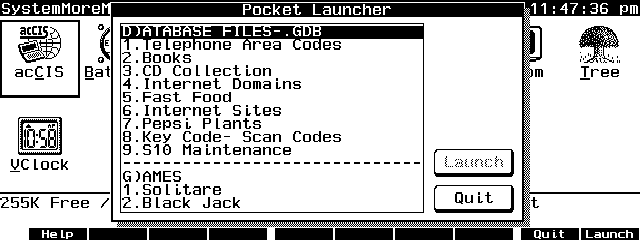
Pocket Launcher is an EXM program to launch an application, execute a DOS command or repeat predefined keystrokes from a configurable menu. Copyrighted freware.
Ficha técnica
- Fichero
lnch102.zip- Tamaño
- 17.7 KB
- Formato
- .zip
- Año
- 1996
- Alta en S.U.P.E.R.
- 1996-11-11
- Ficheros dentro
- 5
- Autor
- TONTATA
- Ruta
anonftp/pub/lnch102.zip
Cómo instalarlo
Qué enviar al palmtop ahorras 14.2 KB
Estos son los ficheros que necesitas. Puedes enviarlos desde el contenido del paquete.
-
LAUNCHER.EXM→ A:\SOFT aplicación del System Manager 8.2 KB -
LAUNCHER.CFG→ A:\_DAT configuración 4.8 KB
No hace falta llevar al palmtop
README.TXT, LAUNCHER.DOC, SOURCE.ZIP:
son manuales, código fuente o material de apoyo. Léelos aquí y ahórrate 14.2 KB en un disco de 1 MB.
Pasos
- Copia LAUNCHER.EXM a A:\SOFT. Es una aplicación del System Manager: regístrala en App Manager con F2 (Add), indicando la ruta completa (por ejemplo A:\SOFT\LAUNCHER.EXM).
- El 200LX admite 8 aplicaciones EXM como máximo. Comprueba con F8 (List) en App Manager: si ves un * en la columna Status, tienes el cupo lleno y necesitarás MoreEXM.
- Copia LAUNCHER.CFG a A:\_DAT, que es donde el 200LX busca la configuración. Ábrelo con Memo y ajústalo antes de usarlo.
- Si editas un fichero de configuración en el palmtop, asegúrate de dejar un salto de línea al final: hay programas que se comen la última línea sin avisar.
Deducido del contenido del paquete y de las convenciones del 200LX. Se instala en A: a propósito: C: es un disco RAM y cada byte ahí resta memoria al sistema.
Necesita también 3
El manual cita estos ficheros, que están en el archivo:
Instrucciones del autor
[Installation]
Place launcher.exm in your preferred directory and add it to
MOREEXM.INI with "1," parameter (Suppress ClearScreen). For
example, if you want to use Ctrl+F1 (key code 5e00) as a start
key and if you copied LAUNCHER.EXM TO A:\BIN\, then you should
add a following line to MOREEXM.INI:
      a:\bin\launcher.exm,5e00,1,Launcher
Then reboot the system to make this change to take effect.

Create LAUNCHER.CFG and place it in C:\_DAT or A:\_DAT.
(C:\_DAT is searched first)   LAUNCHER.CFG included in this
package is for reference only.  DO NOT USE IT AS IT IS!  You
should customize it to suit your purpose.  See below for the
format of LAUNCHER.CFG.


[Usage]
When started, LAUNCHER.EXM shows a title list.  Move the
highlight bar to the item you like to select and press {Enter}
to run. {F10}(Launch) key or tabbing to (Launch) button also
works.  {Esc} or {F9}(Quit) key or tabbing to (Quit) button
will exit from the list without launching.

As well as normal arrow key assignment, {Left} and {Right}
will jump to the previous and next separator item.


[Format of LAUNCHER.CFG]
Format of LAUNCHER.CFG file is as follows.

- Data are written as two parts in one line: a title and a
  command string, separated by one or more {Tab} characters.
  Command string is 255 bytes max.
- If a command string begins with "$key,", the string following
  it is treated as key input and directed into the keyboard
  buffer.  See below for Key Notation.
- If a command string begins with "$ADB,", "$PDB,", "$GDB," or
  "$NDB,", then the string following it is regarded as a target
  file name and will be opened after launching Appointments,
  PhoneBook, Database or NoteTaker respectively.
- If a command string begins with "(numerals),", the string
…
Extracto literal de LAUNCHER.DOC, tal cual venía en el paquete.
Contenido del paquete
Enviar a mi palmtop
El palmtop tiene que quedar esperando antes de pulsar el botón, o la transferencia fallará. Es él quien avisa de que está listo, no al revés.
Tu navegador no puede hablar con el puerto serie. El envío directo usa la Web Serial API, que solo existe en Chrome, Edge y Opera de escritorio — no en Firefox, Safari ni en ningún navegador móvil.
Descarga el fichero con el botón de arriba y pásalo al palmtop con tu método habitual.