
FAXGUI
Version 1.0 · Jorgen Wallgren
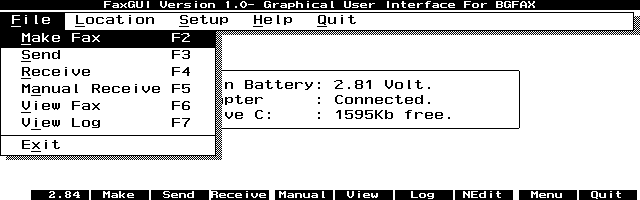
Description
FAXGUI is a palmtop poweruser's answer to the lack of an excellent fax program for the HP 100/200LX. BGFAX is a great fax program that runs nicely, but it does not have the greatest user interface. The author created a rich interface to BGFAX using LXBatch. He even includes the source code. Using the 2FAX program, you can add graphics and your signature to customize faxes. This program is released with no support and minimal documentation, but it is good enough that it should not be kept from the palmtop community. Freeware.
Technical details
- File
faxgui10.zip- Size
- 55.0 KB
- Format
- .zip
- Year
- 1998
- Added to S.U.P.E.R.
- 1998-05-23
- Files inside
- 12
- Author
- Jorgen Wallgren
- Path
anonftp/pub/faxgui10.zip
How to install it
What to send to the palmtop saves 39.7 KB
These are the files you need. You can send them from the package contents below.
-
FAXGUI.ICN→ A:\SOFT icono, junto a su aplicación 200 B -
FAXGUI.ENV→ A:\_DAT configuración 559 B -
FAXGUI.EXE→ A:\SOFT programa de DOS 56.3 KB -
MAKEIT.BAT→ A:\SOFT programa de DOS 56 B -
RECEIVE.BAT→ A:\SOFT programa de DOS 147 B -
SENDIT.BAT→ A:\SOFT programa de DOS 425 B -
VIEWIT.BAT→ A:\SOFT programa de DOS 175 B -
EXTERNAL.BAT→ A:\SOFT programa de DOS 147 B -
2FAX.BAT→ A:\SOFT programa de DOS 64 B
No need to put
BGFAX.CNF, FAXGUI.LXB, readme.txt:
they are manuals, source code or supporting material. Read them here and save 39.7 KB on a 1 MB disk.
Steps
- Copy FAXGUI.EXE, MAKEIT.BAT, RECEIVE.BAT, SENDIT.BAT to A:\SOFT. They are DOS programs: run them from the DOS icon, or add A:\SOFT to the PATH in C:\AUTOEXEC.BAT to call them by name.
- Copy FAXGUI.ENV to A:\_DAT, where the 200LX looks for configuration. Open it with Memo and adjust it before use.
- If you edit a configuration file on the palmtop, make sure you leave a newline at the end: some programs swallow the last line without saying a word.
- The .ICN files are icons: they go in the same folder as their application.
Derived from the package contents and the 200LX conventions. It installs to A: on purpose: C: is a RAM disk and every byte there is memory taken from the system.
It also needs 4
The manual mentions these files, which are in the archive:
The author's instructions Japanese
install BGFAX, 2FAX and my GUI- FAXGUI. This set of files can be
set up in many different ways since the programs are very flexible
and as we all know- on a HP 200LX you can do anything!

FAXGUI is unsupported freeware and you can do whatever you
like with it. The only thing you can't do is to use the source
code in making a program if you expect the users to pay you
money. It was created using LXBatch 3.0 by Rob Koenis and I have
included a very messy source code if you want to modify anything.
If you do, I would be interested in a copy!

Since the procedure for conversion of a text file to a fax file
takes some memory as does the fax viewer, I recommend you
to use MaxDOS if you want to run the fax program from SysMgr.
MaxDOS is available at SUPER page- http://www.palmtop.net

Ok, what you need is:

FAXGUI.ZIP: from where you got this file which you are reading now.
BGFAX170.ZIP
2BGFAX.ZIP

All the above files can be found at SUPER page-
http://www.palmtop.net

As I mentioned earlier, this installation can be done in many
different ways. But here is my way (using MaxDOS):
Literal excerpt from readme.txt, exactly as it came in the package.
Package contents
Send to my palmtop
The palmtop must be waiting before you press the button, or the transfer will fail. It is the palmtop that announces it is ready, not the other way round.
Your browser cannot talk to the serial port. Direct sending uses the Web Serial API, which only exists in Chrome, Edge and Opera on desktop — not in Firefox, Safari or any mobile browser.
Download the file with the button above and copy it to the palmtop your usual way.