
Work in progress. This program is still being tested against real hardware and is not ready yet — it is deliberately kept out of the catalogue, the search and the sitemap. You are welcome to look, but do not expect it to work.
ibComm
Version 1.0 · Joseba Ibarra
Description
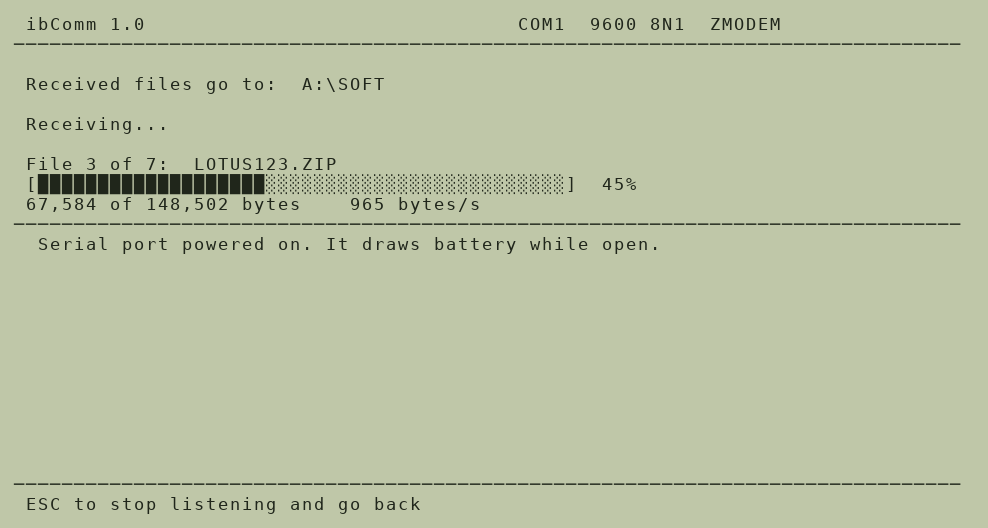
ZMODEM file transfer written specifically for the HP 100LX/200LX, to replace Data Comm at the one job most people use it for: moving files to and from a PC. It sends and receives, weighs 16 KB and stays out of memory. Unlike Data Comm it does not stop after each batch —it announces itself again and keeps listening— it remembers where received files go, and it shows the file name, a progress bar, the byte count, the average speed and "file 3 of 7". The connection settings are fixed at COM1, 9600 baud, 8N1: the values that actually work with the cable, so there is nothing to set up. Written in C for bcc, with the interrupt handler in assembler; the ZMODEM implementation is tested against lrzsz in both directions. Full source included.
This program was not rescued from the archive: it was written for this site. Full source is included in the package and on GitHub.
Technical details
- File
ibcomm10.zip- Size
- 12.0 KB
- Format
- .zip
- Year
- 2026
- Added to S.U.P.E.R.
- 2026-08-16
- Files inside
- 4
- Author
- Joseba Ibarra
- Path
propio/ibcomm10.zip
How to install it
What to send to the palmtop saves 6.6 KB
These are the files you need. You can send them from the package contents below.
-
IBCOMM.COM→ A:\SOFT programa de DOS 17.0 KB
No need to put
README.TXT, LEEME.TXT, FILE_ID.DIZ:
they are manuals, source code or supporting material. Read them here and save 6.6 KB on a 1 MB disk.
Steps
- Copy IBCOMM.COM to A:\SOFT. They are DOS programs: run them from the DOS icon, or add A:\SOFT to the PATH in C:\AUTOEXEC.BAT to call them by name.
Derived from the package contents and the 200LX conventions. It installs to A: on purpose: C: is a RAM disk and every byte there is memory taken from the system.
The author's instructions
INSTALLING

Copy IBCOMM.COM anywhere: the RAM disk (C:) or, better, the memory card
(A:), which costs no system memory. It is a plain DOS program, so run it
from the DOS prompt or add it to the Application Manager as a DOS
application.

IBCOMM.CFG is written next to wherever you run it from.

Nothing else is needed. It does not stay in memory, it does not patch the
system, and it restores the interrupt vector and the serial port power
state when it exits.


A NOTE ON BATTERY

The serial port on the 200LX is powered down to save battery. ibComm only
powers it up while a transfer is actually running, and turns it back off the
moment you return to the menu. It says so on screen both times.


LICENCE AND SOURCE

Free to use, copy and modify. The full source is at:

  https://github.com/Wajalot/hp200lx     (branch: own-apps)

Written in C for bcc (dev86) with the interrupt handler in as86. The ZMODEM
implementation is tested against lrzsz in both directions.
Literal excerpt from README.TXT, exactly as it came in the package.
Package contents
Send to my palmtop
The palmtop must be waiting before you press the button, or the transfer will fail. It is the palmtop that announces it is ready, not the other way round.
Your browser cannot talk to the serial port. Direct sending uses the Web Serial API, which only exists in Chrome, Edge and Opera on desktop — not in Firefox, Safari or any mobile browser.
Download the file with the button above and copy it to the palmtop your usual way.