
Visible Clock
Version 2.3 · Gene Dorr
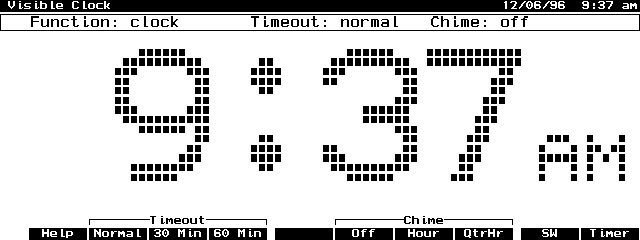
Description
Visible Clock is a system-manager compliant application which displays the time of day in large, easy-to-see characters. Can also be set to chime on the hour or quarter hour. The new release fixes some bugs and includes a German version. Freeware.
Technical details
- File
vclock23.zip- Size
- 41.5 KB
- Format
- .zip
- Year
- 1999
- Added to S.U.P.E.R.
- 1999-05-07
- Files inside
- 9
- Author
- Gene Dorr
- Path
anonftp/pub/vclock23.zip
How to install it
What to send to the palmtop saves 22.6 KB
These are the files you need. You can send them from the package contents below.
-
VCLOCK.EXM→ A:\SOFT aplicación del System Manager 29.8 KB -
VCLOCK.ICN→ A:\SOFT icono, junto a su aplicación 200 B -
VCLOCK.CFG→ A:\_DAT configuración 1.5 KB -
TIMEBALL.ICN→ A:\SOFT icono, junto a su aplicación 200 B -
VCLOCKDE.EXM→ A:\SOFT aplicación del System Manager 30.0 KB -
VCLOCKDE.ICN→ A:\SOFT icono, junto a su aplicación 200 B
No need to put
TIMEBALL.TXT, VCLOCK.TXT, VCLOCKDE.TXT:
they are manuals, source code or supporting material. Read them here and save 22.6 KB on a 1 MB disk.
Steps
- Copy VCLOCK.EXM, VCLOCKDE.EXM to A:\SOFT. It is a System Manager application: register it in App Manager with F2 (Add), giving the full path (for example A:\SOFT\VCLOCK.EXM).
- The 200LX takes 8 EXM applications at most. Check with F8 (List) in App Manager: an asterisk in the Status column means the quota is full and you will need MoreEXM.
- Copy VCLOCK.CFG to A:\_DAT, where the 200LX looks for configuration. Open it with Memo and adjust it before use.
- If you edit a configuration file on the palmtop, make sure you leave a newline at the end: some programs swallow the last line without saying a word.
- The .ICN files are icons: they go in the same folder as their application.
Derived from the package contents and the 200LX conventions. It installs to A: on purpose: C: is a RAM disk and every byte there is memory taken from the system.
The author's instructions German
Installation

Die Installation von VClock benötigt drei Dateien:

VClockde.exm            in einem Verzeichnis Ihrer Wahl
VClockde.icn            in einen Verzeichnis Ihrer Wahl
VClock.cfg              muss nach C:\_DAT kopiert werden

Um VClock im Programm-Manager hinzuzufügen gehen Sie wie folgt vor:

- Programm-Manager aufrufen mit &
- Programm hinzufügen wählen mit F2
- Geben sie dem Eintrag einen Namen (VClock)
- Geben Sie das Verzeichnis und den Dateinamen an
  (Laufwerk):\(Verzeichnisbaum)\VClockde.exm
- Schliessen Sie die Eingaben mit F10 ab.

Visible Clock benötigt ca. 14KB Speicher.


Bedienung

Die  Möglichkeiten  und die Bedienung von  Visible Clock sind in einem
eingebauten  (deutschen)  Hilfetext kurz erläutert.  Sie finden ihm im
Menü   "Hilfe"  unter  den  punkten   "VClock  benutzen"  und  "VClock
kontrollieren".  Für  die  seltener  benutzten  Funktionen  (z.B.  das
Erstellen  eigener Signaltöne und Melodien) sei hier auf die englische
Anleitung  verwiesen.  Es  ist  nicht  sehr  kompliziert  und  wird an
Beispielen erläutert die leicht zu verstehen sind.


Sonstiges

Die   genauere  Betrachtung  des   Programms  aufgrund  der  geplanten
Übersetzung  förderte auch ein paar Fehler zutage, welche alle behoben
werden  konnten:  In der erzeugten  grossen  Schriftart wurden Umlaute
nicht  dargestellt (der März-Bug); die Beschriftung und Funktion einer
F-Taste  im  Timer-Modus  war nicht  korrekt  und funktionslos; ein OK
Knopf in einem Dialog war funktionslos.

Des    weiteren   wurde   das   Layout   verschiedener   Dialoge   und
Darstellungselemente  verändert um den teilweise durch die Übersetzung
länger gewordenen Begriffen gerecht zu werden.
Literal excerpt from VCLOCKDE.TXT, exactly as it came in the package.
Package contents
Send to my palmtop
The palmtop must be waiting before you press the button, or the transfer will fail. It is the palmtop that announces it is ready, not the other way round.
Your browser cannot talk to the serial port. Direct sending uses the Web Serial API, which only exists in Chrome, Edge and Opera on desktop — not in Firefox, Safari or any mobile browser.
Download the file with the button above and copy it to the palmtop your usual way.