
HP Alarm Clock
Version 1.1 · Jorgen Wallgren
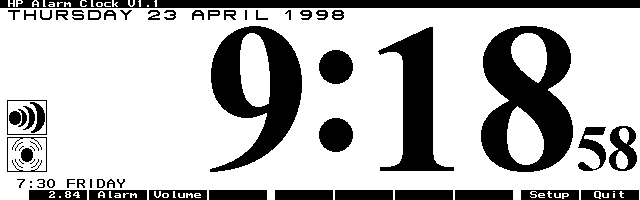
Description
HP Alarm Clock is a system manager-compliant (EXM) clock program which has a high-resolution display of the time. It allows an alarm to be set which will sound even if you close the program or turn off the HP 100/200LX. This newest version has many improvements and some bug fixes. Copyrighted freeware.
Technical details
- File
hpalrm11.zip- Size
- 19.4 KB
- Format
- .zip
- Year
- 1998
- Added to S.U.P.E.R.
- 1998-04-24
- Files inside
- 3
- Author
- Jorgen Wallgren
- Path
anonftp/pub/hpalrm11.zip
How to install it
What to send to the palmtop saves 16.7 KB
These are the files you need. You can send them from the package contents below.
-
HPALARM.ICN→ A:\SOFT icono, junto a su aplicación 200 B -
HPALARM.EXM→ A:\SOFT aplicación del System Manager 37.5 KB
No need to put
HPALARM.TXT:
they are manuals, source code or supporting material. Read them here and save 16.7 KB on a 1 MB disk.
Steps
- Copy HPALARM.EXM to A:\SOFT. It is a System Manager application: register it in App Manager with F2 (Add), giving the full path (for example A:\SOFT\HPALARM.EXM).
- The 200LX takes 8 EXM applications at most. Check with F8 (List) in App Manager: an asterisk in the Status column means the quota is full and you will need MoreEXM.
- The .ICN files are icons: they go in the same folder as their application.
Derived from the package contents and the 200LX conventions. It installs to A: on purpose: C: is a RAM disk and every byte there is memory taken from the system.
The author's instructions
REMOVE YOUR INSTALLATION AND ALL THE FILES INCLUDING THE
C:\_DAT\HPALARM.ENV BEFORE YOU INSTALL THIS NEW VERSION.
OTHERWISE YOUR PALMTOP WILL HANG THE FIRST TIME YOU RUN THIS
NEW VERSION.

FOR INFORMATION ABOUT NEW FEATURES IN THIS VERSION, PLEASE LOOK
IN THE SECTION CALLED "REVISION HISTORY" IN THE END OF THIS
DOCUMENT.

HP ALARM CLOCK is a System Manager (EXM) clock program which has
a high resolution display of the time.  It allows an alarm to be
set which will sound even if you close the program and even if
you turn off the HP200LX.  However, if you have terminated the
Systems Manager by using the {&...} {Menu} [A]pplications
[T]erminate all key sequence, the Alarm will not sound.

The Usual Legal Stuff:

HP ALARM CLOCK is Freeware for the HP 100LX/200LX Palmtop PC's.
As Freeware, it may or may not be supported in the future.  This
program is Free, and you may do what you want with it, as long
as you do not change anything in the program.  You may
distribute this program, as long as it is distributed as a
compressed file named HPALARM.ZIP.  It must contain the
following files:

 HPALARM.EXM
 HPALARM.ICN
 HPALARM.TXT

I will not be responsible for any damages, including but not
limited to data loss or your not waking up in time for a
important meeting.  It is highly recommended that you backup all
data in your computer regularly, and that you make sure that the
alarm in HP ALARM CLOCK is set correctly.  In other words, you
are responsible for any damages that may result if you decide to
use HP ALARM CLOCK.  I -- the author -- am not.


INSTALLATION:

You can install and run an EXM program such as HP ALARM CLOCK in
many different ways.  However, I strongly recommend that you
follow this installation procedure:
Literal excerpt from HPALARM.TXT, exactly as it came in the package.
Package contents
Send to my palmtop
The palmtop must be waiting before you press the button, or the transfer will fail. It is the palmtop that announces it is ready, not the other way round.
Your browser cannot talk to the serial port. Direct sending uses the Web Serial API, which only exists in Chrome, Edge and Opera on desktop — not in Firefox, Safari or any mobile browser.
Download the file with the button above and copy it to the palmtop your usual way.