
HP Alarm Clock
Versión 1.1 · Jorgen Wallgren
Descripción
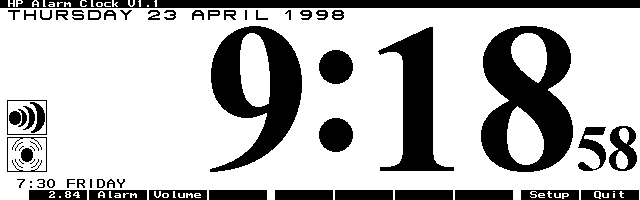
HP Alarm Clock is a system manager-compliant (EXM) clock program which has a high-resolution display of the time. It allows an alarm to be set which will sound even if you close the program or turn off the HP 100/200LX. This newest version has many improvements and some bug fixes. Copyrighted freeware.
Ficha técnica
- Fichero
hpalrm11.zip- Tamaño
- 19.4 KB
- Formato
- .zip
- Año
- 1998
- Alta en S.U.P.E.R.
- 1998-04-24
- Ficheros dentro
- 3
- Autor
- Jorgen Wallgren
- Ruta
anonftp/pub/hpalrm11.zip
Cómo instalarlo
Qué enviar al palmtop ahorras 16.7 KB
Estos son los ficheros que necesitas. Puedes enviarlos desde el contenido del paquete.
-
HPALARM.ICN→ A:\SOFT icono, junto a su aplicación 200 B -
HPALARM.EXM→ A:\SOFT aplicación del System Manager 37.5 KB
No hace falta llevar al palmtop
HPALARM.TXT:
son manuales, código fuente o material de apoyo. Léelos aquí y ahórrate 16.7 KB en un disco de 1 MB.
Pasos
- Copia HPALARM.EXM a A:\SOFT. Es una aplicación del System Manager: regístrala en App Manager con F2 (Add), indicando la ruta completa (por ejemplo A:\SOFT\HPALARM.EXM).
- El 200LX admite 8 aplicaciones EXM como máximo. Comprueba con F8 (List) en App Manager: si ves un * en la columna Status, tienes el cupo lleno y necesitarás MoreEXM.
- Los .ICN son iconos: van en la misma carpeta que su aplicación.
Deducido del contenido del paquete y de las convenciones del 200LX. Se instala en A: a propósito: C: es un disco RAM y cada byte ahí resta memoria al sistema.
Instrucciones del autor
REMOVE YOUR INSTALLATION AND ALL THE FILES INCLUDING THE
C:\_DAT\HPALARM.ENV BEFORE YOU INSTALL THIS NEW VERSION.
OTHERWISE YOUR PALMTOP WILL HANG THE FIRST TIME YOU RUN THIS
NEW VERSION.

FOR INFORMATION ABOUT NEW FEATURES IN THIS VERSION, PLEASE LOOK
IN THE SECTION CALLED "REVISION HISTORY" IN THE END OF THIS
DOCUMENT.

HP ALARM CLOCK is a System Manager (EXM) clock program which has
a high resolution display of the time.  It allows an alarm to be
set which will sound even if you close the program and even if
you turn off the HP200LX.  However, if you have terminated the
Systems Manager by using the {&...} {Menu} [A]pplications
[T]erminate all key sequence, the Alarm will not sound.

The Usual Legal Stuff:

HP ALARM CLOCK is Freeware for the HP 100LX/200LX Palmtop PC's.
As Freeware, it may or may not be supported in the future.  This
program is Free, and you may do what you want with it, as long
as you do not change anything in the program.  You may
distribute this program, as long as it is distributed as a
compressed file named HPALARM.ZIP.  It must contain the
following files:

 HPALARM.EXM
 HPALARM.ICN
 HPALARM.TXT

I will not be responsible for any damages, including but not
limited to data loss or your not waking up in time for a
important meeting.  It is highly recommended that you backup all
data in your computer regularly, and that you make sure that the
alarm in HP ALARM CLOCK is set correctly.  In other words, you
are responsible for any damages that may result if you decide to
use HP ALARM CLOCK.  I -- the author -- am not.


INSTALLATION:

You can install and run an EXM program such as HP ALARM CLOCK in
many different ways.  However, I strongly recommend that you
follow this installation procedure:
Extracto literal de HPALARM.TXT, tal cual venía en el paquete.
Contenido del paquete
Enviar a mi palmtop
El palmtop tiene que quedar esperando antes de pulsar el botón, o la transferencia fallará. Es él quien avisa de que está listo, no al revés.
Tu navegador no puede hablar con el puerto serie. El envío directo usa la Web Serial API, que solo existe en Chrome, Edge y Opera de escritorio — no en Firefox, Safari ni en ningún navegador móvil.
Descarga el fichero con el botón de arriba y pásalo al palmtop con tu método habitual.