
CLOCK
Version 1.0 · Viczian Gergo
Description
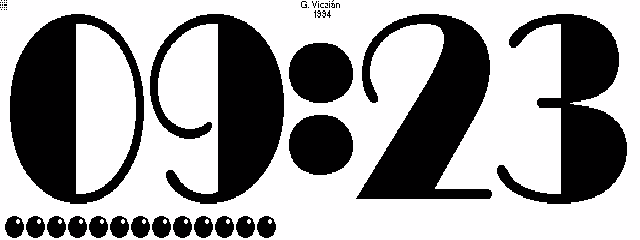
CLOCK is a small system manager-compliant clock with huge digits. Has customizable fonts available from the author. Freeware/postcardware.
Technical details
- File
clock.zip- Size
- 5.8 KB
- Format
- .zip
- Year
- 1996
- Added to S.U.P.E.R.
- 1996-11-22
- Files inside
- 2
- Author
- Viczian Gergo
- Path
anonftp/pub/clock.zip
How to install it
What to send to the palmtop saves 2.0 KB
These are the files you need. You can send them from the package contents below.
-
CLOCK.EXM→ A:\SOFT aplicación del System Manager 8.1 KB
No need to put
CLOCK.DOC:
they are manuals, source code or supporting material. Read them here and save 2.0 KB on a 1 MB disk.
Steps
- Copy CLOCK.EXM to A:\SOFT. It is a System Manager application: register it in App Manager with F2 (Add), giving the full path (for example A:\SOFT\CLOCK.EXM).
- The 200LX takes 8 EXM applications at most. Check with F8 (List) in App Manager: an asterisk in the Status column means the quota is full and you will need MoreEXM.
Derived from the package contents and the 200LX conventions. It installs to A: on purpose: C: is a RAM disk and every byte there is memory taken from the system.
The author's instructions
Installation

Copy the file into any directory on your palmtop.  Register it in
the More Applications program by "add"-ing (F2) a new record and
pointing the path to it.  I also included an icon file in the
archive, copy it in the same directory where the .exm file
resides to have More Applications recognize it.

Assign a suitable shortcut key combination (I suggest ALT-APPT
since it has a clock on it).


Usage

Start the program with its hotkey.

Press <SPACE> to toggle seconds display.  Seconds are displayed as
bullets.  You have three options:

No seconds  this is for battery-friendly operation

-> <-       in the first half of the minute bullets added from
            left, in the other half bullets are taken away from
            the right

-> ->       first 30 second as above, then taken away also from
            the left

(Try the program and you will get it)

Press <ESC> to close program.


Extra

I've built in one font for the digits, there are however a couple
of other good looking typefaces.  I have placed them in a password
protected archive.  I'll be happy to send the key and instructions
to anyone who requests them from me on a nice postcard.

Send me a postcard to the address...

Gergo Viczian
Hidasz u. 7.
Budapest
H-1026 Hungary

...and you will receive a password for the archive clockfnt.zip,
which contains the following extra digit-typefaces:

	* trafalgar	* bassoon	*scott
	* timpani	* vogue
	* broadway	* merlin

Be sure to INCLUDE YOUR E-MAIL address, so I can respond to you.
I can be reach by email: gergo@evt.bme.hu
Check my web page for more programs:
	http://www.evt.bme.hu/~gergo/100lx/100lx.htm
Literal excerpt from CLOCK.DOC, exactly as it came in the package.
Package contents
Send to my palmtop
The palmtop must be waiting before you press the button, or the transfer will fail. It is the palmtop that announces it is ready, not the other way round.
Your browser cannot talk to the serial port. Direct sending uses the Web Serial API, which only exists in Chrome, Edge and Opera on desktop — not in Firefox, Safari or any mobile browser.
Download the file with the button above and copy it to the palmtop your usual way.