
MPG Tracker
Version 1.0 · Owen Samuelson KU4ET
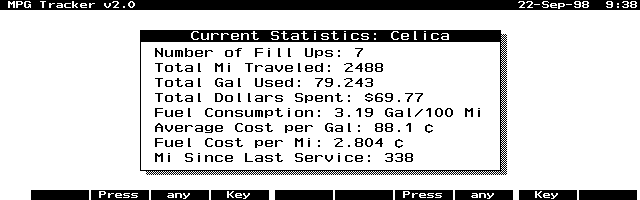
Description
MPG Tracker is a PAL program that tracks your vehicle's MPG and other data by inputting data at each tank fill-up. Many improvements in this new version. Copyrighted freeware. Portions copyright The Pal Group.
Technical details
- File
mpgt10.zip- Size
- 34.3 KB
- Format
- .zip
- Year
- 1998
- Added to S.U.P.E.R.
- 1998-09-22
- Files inside
- 3
- Author
- Owen Samuelson KU4ET
- Path
anonftp/pub/mpgt10.zip
How to install it
What to send to the palmtop saves 3.6 KB
These are the files you need. You can send them from the package contents below.
-
Mpg.icn→ A:\SOFT icono, junto a su aplicación 200 B -
Mpg.exe→ A:\SOFT programa de DOS 32.3 KB
No need to put
mpgdoc.txt:
they are manuals, source code or supporting material. Read them here and save 3.6 KB on a 1 MB disk.
Steps
- Copy Mpg.exe to A:\SOFT. They are DOS programs: run them from the DOS icon, or add A:\SOFT to the PATH in C:\AUTOEXEC.BAT to call them by name.
- The .ICN files are icons: they go in the same folder as their application.
Derived from the package contents and the 200LX conventions. It installs to A: on purpose: C: is a RAM disk and every byte there is memory taken from the system.
The author's instructions
Installation:

  Unzip the archive using pkunzip.  Download the files to the
palmtop into any directory and on any disk you wish.

  You can use the mpg.icn icon file to install the program in
the Application Manager, HDM, SMMx or some other program
launcher.

  For the Application Manager press F2 (Add) and fill in the
fields as follows:

  Name: MPG Track (or any name you want)
  Path: a:\bin\mpg.exe (Change this to reflect your disk:\path)
  Comments: ¿ (press Fn-? to get the upside-down question mark)

  If you TAB to the Icon window the icon should appear.
  Press F10 (OK).


  NOTE: You can delete the mpg.doc and mpg.icn files as they
are not needed to run the program.


User Guide

  Start Up:

  When the program is started for the first time, you should
enter the description of your vehicle and the current odometer
reading. This process will create the mpg.dat file. WARNING:
Even though the mpg.dat file is just a text file, I don't
recommend that you edit this file. Let the program do it!
After entering a lot of fill-up data, editing this file
separately could mess up the accuracy of the "Totals" data.


  General:

  The program uses the function keys, number keys, menu key
and the arrow keys and has the look and feel of the built-in
applications.


F1: 'Help'     A small Helpfile
F2: 'Totals'   A window showing the total data calculated.
F3: 'Fillup'   Press this when you fill you tank.
F4: 'Service'  Press this to record the odometer reading
               when service is performed.


  Leaving the program:

  To leave MPG Tracker, select Menu | Quit or press F10 or ESC.


Credits

  This program was developed and compile entirely on an
HP200LX.  I used Microsoft QuickC in conjunction with the
Palmtop Application Library (PAL), which made this effort
…
Literal excerpt from mpgdoc.txt, exactly as it came in the package.
Package contents
Send to my palmtop
The palmtop must be waiting before you press the button, or the transfer will fail. It is the palmtop that announces it is ready, not the other way round.
Your browser cannot talk to the serial port. Direct sending uses the Web Serial API, which only exists in Chrome, Edge and Opera on desktop — not in Firefox, Safari or any mobile browser.
Download the file with the button above and copy it to the palmtop your usual way.