
MPG Tracker
Versión 1.0 · Owen Samuelson KU4ET
Descripción
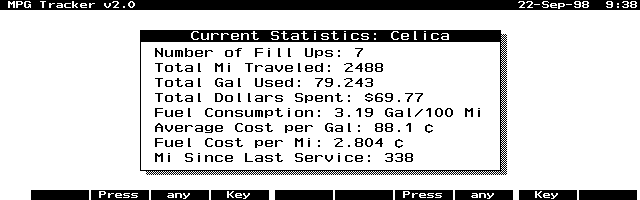
MPG Tracker is a PAL program that tracks your vehicle's MPG and other data by inputting data at each tank fill-up. Many improvements in this new version. Copyrighted freeware. Portions copyright The Pal Group.
Ficha técnica
- Fichero
mpgt10.zip- Tamaño
- 34.3 KB
- Formato
- .zip
- Año
- 1998
- Alta en S.U.P.E.R.
- 1998-09-22
- Ficheros dentro
- 3
- Autor
- Owen Samuelson KU4ET
- Ruta
anonftp/pub/mpgt10.zip
Cómo instalarlo
Qué enviar al palmtop ahorras 3.6 KB
Estos son los ficheros que necesitas. Puedes enviarlos desde el contenido del paquete.
-
Mpg.icn→ A:\SOFT icono, junto a su aplicación 200 B -
Mpg.exe→ A:\SOFT programa de DOS 32.3 KB
No hace falta llevar al palmtop
mpgdoc.txt:
son manuales, código fuente o material de apoyo. Léelos aquí y ahórrate 3.6 KB en un disco de 1 MB.
Pasos
- Copia Mpg.exe a A:\SOFT. Son programas de DOS: se ejecutan desde el icono DOS, o añadiendo A:\SOFT al PATH de C:\AUTOEXEC.BAT para poder llamarlos por su nombre.
- Los .ICN son iconos: van en la misma carpeta que su aplicación.
Deducido del contenido del paquete y de las convenciones del 200LX. Se instala en A: a propósito: C: es un disco RAM y cada byte ahí resta memoria al sistema.
Instrucciones del autor
Installation:

  Unzip the archive using pkunzip.  Download the files to the
palmtop into any directory and on any disk you wish.

  You can use the mpg.icn icon file to install the program in
the Application Manager, HDM, SMMx or some other program
launcher.

  For the Application Manager press F2 (Add) and fill in the
fields as follows:

  Name: MPG Track (or any name you want)
  Path: a:\bin\mpg.exe (Change this to reflect your disk:\path)
  Comments: ¿ (press Fn-? to get the upside-down question mark)

  If you TAB to the Icon window the icon should appear.
  Press F10 (OK).


  NOTE: You can delete the mpg.doc and mpg.icn files as they
are not needed to run the program.


User Guide

  Start Up:

  When the program is started for the first time, you should
enter the description of your vehicle and the current odometer
reading. This process will create the mpg.dat file. WARNING:
Even though the mpg.dat file is just a text file, I don't
recommend that you edit this file. Let the program do it!
After entering a lot of fill-up data, editing this file
separately could mess up the accuracy of the "Totals" data.


  General:

  The program uses the function keys, number keys, menu key
and the arrow keys and has the look and feel of the built-in
applications.


F1: 'Help'     A small Helpfile
F2: 'Totals'   A window showing the total data calculated.
F3: 'Fillup'   Press this when you fill you tank.
F4: 'Service'  Press this to record the odometer reading
               when service is performed.


  Leaving the program:

  To leave MPG Tracker, select Menu | Quit or press F10 or ESC.


Credits

  This program was developed and compile entirely on an
HP200LX.  I used Microsoft QuickC in conjunction with the
Palmtop Application Library (PAL), which made this effort
…
Extracto literal de mpgdoc.txt, tal cual venía en el paquete.
Contenido del paquete
Enviar a mi palmtop
El palmtop tiene que quedar esperando antes de pulsar el botón, o la transferencia fallará. Es él quien avisa de que está listo, no al revés.
Tu navegador no puede hablar con el puerto serie. El envío directo usa la Web Serial API, que solo existe en Chrome, Edge y Opera de escritorio — no en Firefox, Safari ni en ningún navegador móvil.
Descarga el fichero con el botón de arriba y pásalo al palmtop con tu método habitual.