
GPSCGA
Version 2.7 · COMACS Enterprises
Description
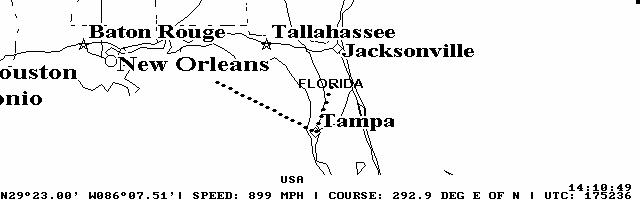
GPSCGA is an excellent DOS-based GPS moving map program that runs nicely on the palmtop. The registered version includes a PCX converter so you can create custom maps and calibrate them for use with the program. Now with improved Tripmate support. Shareware.
Technical details
- File
gpscga27.zip- Size
- 574.9 KB
- Format
- .zip
- Year
- 1997
- Added to S.U.P.E.R.
- 1997-04-15
- Files inside
- 13
- Author
- COMACS Enterprises
- Path
anonftp/pub/gpscga27.zip
How to install it
What to send to the palmtop saves 128.1 KB
These are the files you need. You can send them from the package contents below.
-
GPSCGA.EXE→ A:\SOFT programa de DOS 110.1 KB -
CITIES.DAT→ A:\_DAT configuración 173.0 KB -
AIRPORTS.DAT→ A:\_DAT configuración 852.2 KB -
WORLD.DAT→ A:\_DAT configuración 117.6 KB -
READ.COM→ A:\SOFT programa de DOS 1.1 KB -
LOGO.SYS→ A:\SOFT driver, necesita línea en CONFIG.SYS 5.1 KB -
USA.INI→ A:\_DAT configuración 21 B
No need to put
USA.CGA, USA.RES, USA.LOG, README.TXT, GRID.CGA, GPSCGA.HLP:
they are manuals, source code or supporting material. Read them here and save 128.1 KB on a 1 MB disk.
Steps
- LOGO.SYS is a driver: add DEVICE=A:\SOFT\LOGO.SYS to C:\CONFIG.SYS and reboot with Ctrl+Alt+Del.
- Copy GPSCGA.EXE, READ.COM to A:\SOFT. They are DOS programs: run them from the DOS icon, or add A:\SOFT to the PATH in C:\AUTOEXEC.BAT to call them by name.
- Copy CITIES.DAT, AIRPORTS.DAT, WORLD.DAT, USA.INI to A:\_DAT, where the 200LX looks for configuration. Open it with Memo and adjust it before use.
- If you edit a configuration file on the palmtop, make sure you leave a newline at the end: some programs swallow the last line without saying a word.
Derived from the package contents and the 200LX conventions. It installs to A: on purpose: C: is a RAM disk and every byte there is memory taken from the system.
The author's instructions
When installing GPSCGA on a flashcard or similar mass storage
         device, WINDOWS 95 may cause a problem. Due to a bug (?) the
         directory command lists the size of GPSCGA.EXE wrongly. The
         correct size of version 2.7 is 112,702 bytes. The program executes
         correctly on WINDOWS 95 systems. If, however, WINDOWS 95 utilities
         are used to copy the GPSCGA system to a mass storage device to be
         used in the HP100LX/200LX, some users report that the EXE-file
         hangs when invoked on the palmtop. The only remedy we know is
         to use an earlier version of DOS/WINDOWS for transfer. Also note
         that the DOS system RAM parameter in SETUP/ADVANCED has to be
         set at 160K. Due to the processor speed, searches on the palm-
         top may take up to 60 seconds and map re-displays up to 5
         seconds. You may run GPSCGA from SYSMGR but be prepared for some
         incomplete or corrupt data receptions. This is due to the fact
         that the SYSMGR seizes control of the communications port from
         time to time. Therefore the recommendation is to Terminate All
         programs and run GPSCGA from the DOS-level. To re-enter SYSMGR
         just type 100 or 200 and press ENTER. Also, when you run GPSCGA
         from the SYSMGR beware of switching to other applications: You
         lose the communications port and your log file.

         This demo version of GPSCGA is fully functional with the exception
         of map creation. GPSCGA uses a proprietary map file format.
         Registered users receive the conversion program PCXTOCGA that
         converts any B/W map stored in the PCX file format to the
         proprietary map file format. The conversion program requires a PC
…
Literal excerpt from GPSCGA.HLP, exactly as it came in the package.
Package contents
Send to my palmtop
The palmtop must be waiting before you press the button, or the transfer will fail. It is the palmtop that announces it is ready, not the other way round.
Your browser cannot talk to the serial port. Direct sending uses the Web Serial API, which only exists in Chrome, Edge and Opera on desktop — not in Firefox, Safari or any mobile browser.
Download the file with the button above and copy it to the palmtop your usual way.