
LXGPS
Version 1.7 · Greg Renda
Description
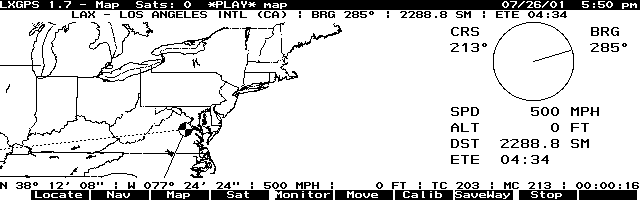
LXGPS connects your HP 100/200 LX to a GPS receiver that communicates using the standard NMEA 0183 protocol over a serial line. LXGPS features a moving map display using user supplied maps in PCX format, navigation to user defined waypoints, sattelite tracking and signal strength display, setting of palmtop time from GPX time. Copyrighted freeware. Check Greg Renda's Homepage to check for a more recent version. Click here to see other GPS related programs.
Technical details
- File
lxgps17.zip- Size
- 98.6 KB
- Format
- .zip
- Year
- 2001
- Added to S.U.P.E.R.
- 2002-01-25
- Files inside
- 13
- Author
- Greg Renda
- Path
anonftp/pub/lxgps17.zip
How to install it
What to send to the palmtop saves 72.3 KB
These are the files you need. You can send them from the package contents below.
-
lxgps.exe→ A:\SOFT programa de DOS 142.1 KB -
lxgps.icn→ A:\SOFT icono, junto a su aplicación 200 B -
cursor.icn→ A:\SOFT icono, junto a su aplicación 200 B -
plane.icn→ A:\SOFT icono, junto a su aplicación 200 B
No need to put
master.way, map.pcx, map.ind, list.way, lxgps.log, lxgps.doc, changes, todo and 1 more:
they are manuals, source code or supporting material. Read them here and save 72.3 KB on a 1 MB disk.
Steps
- Copy lxgps.exe to A:\SOFT. They are DOS programs: run them from the DOS icon, or add A:\SOFT to the PATH in C:\AUTOEXEC.BAT to call them by name.
- The .ICN files are icons: they go in the same folder as their application.
Derived from the package contents and the 200LX conventions. It installs to A: on purpose: C: is a RAM disk and every byte there is memory taken from the system.
The author's instructions
Installation

The LXGPS distribution includes the following files:

	lxgps.exe               the main program
	lxgps.icn               an icon for LXGPS (thanks to Robb Bates)
	cursor.icn              the default cursor for the moving map
	plane.icn               an airplane cursor for the moving map
	master.way              master waypoints file (US airports)
	list.way                sample waypoint list
	map.pcx                 sample map file (US lower-48, calibrated)
	map.ind                 index for sample map file
	lxgps.log               sample log file
	changes                 a list of changes between versions of LXGPS
	faq                     some frequently asked questions
	todo                    a wish list of features
	lxgps.doc               this file

To install, just copy these files to your palmtop.  For a minimum
installation just copy lxgps.exe.  If you launch LXGPS from the App
Manager, make sure you've got an upside-down exclamation point in the
comments field (Fn FILER) to ensure the serial port isn't getting messed
up by the System Manager.  Also make sure the serial port is enabled.

Running LXGPS

All the display modes in LXGPS share three common features:

    Title bar
	The title bar displays the LXGPS version, current display
	mode, number of satellites in use, log recording and playback
	indicators, map name and the current local date and time.

    Function key labels
	Labels describing the shortcut commands for each function key.

    Current GPS info
	A status line directly above the function key labels that
	shows latitude, longitude, speed, altitude, true course,
	magnetic course, and UTC time.

Display Modes

LXGPS has several ways of displaying the information from the GPS
…
Literal excerpt from lxgps.doc, exactly as it came in the package.
Package contents
Send to my palmtop
The palmtop must be waiting before you press the button, or the transfer will fail. It is the palmtop that announces it is ready, not the other way round.
Your browser cannot talk to the serial port. Direct sending uses the Web Serial API, which only exists in Chrome, Edge and Opera on desktop — not in Firefox, Safari or any mobile browser.
Download the file with the button above and copy it to the palmtop your usual way.