
BUDDY
Version 3.0 · Jeffrey Mattox
Description
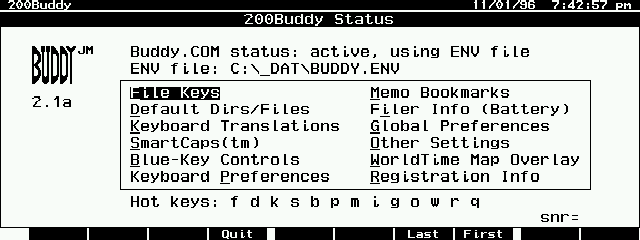
Buddy is the ultimate add-in for increasing the functionality and usefullness of your palmtop. Only works on English palmtops. Has a mutlitude of features including: smart capitalization, intelligent app-based macro file handling, blue key remapping, day/night world time diplay, flashing alarms, and many, many more. The new version includes a DOS-only option, many new features and bug fixes and greatly enhanced macro capability. Highly recommended. Shareware.
Technical details
- File
buddy.zip- Size
- 135.3 KB
- Format
- .zip
- Year
- 1997
- Added to S.U.P.E.R.
- 1997-05-07
- Files inside
- 10
- Author
- Jeffrey Mattox
- Path
anonftp/pub/buddy.zip
How to install it
What to send to the palmtop saves 219.6 KB
These are the files you need. You can send them from the package contents below.
-
BUDDY.COM→ A:\SOFT programa de DOS 61.2 KB -
BUDDY.EXM→ A:\SOFT aplicación del System Manager 38.0 KB -
BUDDY.ICN→ A:\SOFT icono, junto a su aplicación 200 B -
BUDDYDOS.COM→ A:\SOFT programa de DOS 15.8 KB
No need to put
BUDDY.HLP, README, BUDDY.TXT, VERSION3.TXT, FAQ3.TXT, REGISTER.TXT:
they are manuals, source code or supporting material. Read them here and save 219.6 KB on a 1 MB disk.
Steps
- Copy BUDDY.EXM to A:\SOFT. It is a System Manager application: register it in App Manager with F2 (Add), giving the full path (for example A:\SOFT\BUDDY.EXM).
- The 200LX takes 8 EXM applications at most. Check with F8 (List) in App Manager: an asterisk in the Status column means the quota is full and you will need MoreEXM.
- Copy BUDDY.COM, BUDDYDOS.COM to A:\SOFT. They are DOS programs: run them from the DOS icon, or add A:\SOFT to the PATH in C:\AUTOEXEC.BAT to call them by name.
- The .ICN files are icons: they go in the same folder as their application.
Derived from the package contents and the 200LX conventions. It installs to A: on purpose: C: is a RAM disk and every byte there is memory taken from the system.
The author's instructions
(See the HP SETUP or main Buddy EXM display for the version number.)

Shareware version:    $40.00 US           amount enclosed: $________
Sorry, I cannot accept credit cards.
Check here (  ) and add $15.00 to receive a formatted, printed, and
bound copy of the 65-page user's manual, BUDDY.TXT (8.5" x 11").
Corporate customers (Paperwork Reduction Act): please prepay single-copy
registrations.  Contact me about multiple-copy licenses (10 or more).

International users:  Please add $1.00 for diskette postage (if you need
a diskette) and $5.00 for manual postage.  I cannot accept Eurocheques.
All checks MUST have the name and address of a U.S. member bank,
otherwise it costs me too much to process the check.  You may also send
U.S. cash or an  International Postal Money Order.

a.  My machine is a:                  _____100LX      _____200LX
b.  My HP 100LX/200LX memory size is: ___1Meg __2Meg __4Meg __6M
c.  I heard about Buddy via:           _________________________
d.  I obtained my copy of Buddy from:  _________________________
e.  I have the following add-in EXMs:  _________________________
f.  I have the following add-in TSRs:  _________________________
g.  Favorite 100LX/200LX editor:      __________________________
h.  Buddy features:    most useful:   __________________________
                       least useful:  __________________________
i.  Comments:


Mail to:  The Buddy System, LLC,  PO Box 45282, Madison,  WI  53744-5282
e-mail:   CompuServe: 71044,2356    Internet: info@buddy.com.
voice:    Jeff at (608) 831-1103
            call in the evenings after 7:00 pm U.S. Central time only.
Web:      http://www.buddy.com                                   Rel 3.0
Literal excerpt from REGISTER.TXT, exactly as it came in the package.
Package contents
Send to my palmtop
The palmtop must be waiting before you press the button, or the transfer will fail. It is the palmtop that announces it is ready, not the other way round.
Your browser cannot talk to the serial port. Direct sending uses the Web Serial API, which only exists in Chrome, Edge and Opera on desktop — not in Firefox, Safari or any mobile browser.
Download the file with the button above and copy it to the palmtop your usual way.