
Account Pro for DOS
Versión 1.11d · AccSoft Shareware, Willy R. Aus der Au
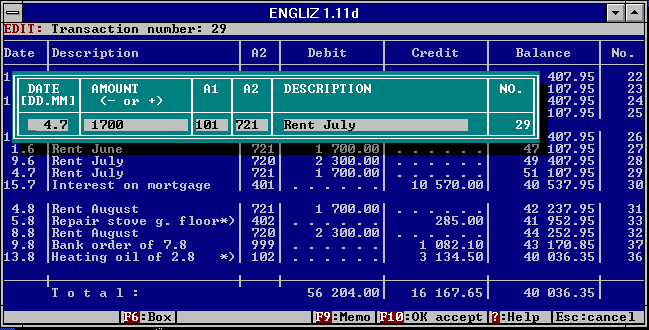
Descripción
If you are looking for a more powerful replacement to Pocket Quicken, you are encouraged to try Account Pro for DOS. Check author's homepage for most recent version and more free software . Copyrighted freeware.
Ficha técnica
- Fichero
apdos.zip- Tamaño
- 267.5 KB
- Formato
- .zip
- Año
- 1994
- Alta en S.U.P.E.R.
- 2004-06-29
- Ficheros dentro
- 6
- Autor
- AccSoft Shareware, Willy R. Aus der Au
- Ruta
anonftp/pub/apdos.zip
Cómo instalarlo
Qué enviar al palmtop ahorras 209.4 KB
Estos son los ficheros que necesitas. Puedes enviarlos desde el contenido del paquete.
-
INSTALL.EXE→ A:\SOFT programa de DOS 58.0 KB -
LHA.EXE→ A:\SOFT programa de DOS 33.2 KB -
RAM.SYS→ A:\SOFT driver, necesita línea en CONFIG.SYS 512 B
No hace falta llevar al palmtop
ACCOUNT.LZH, ORDER.FRM, README.TXT:
son manuales, código fuente o material de apoyo. Léelos aquí y ahórrate 209.4 KB en un disco de 1 MB.
Pasos
- RAM.SYS es un driver: añade DEVICE=A:\SOFT\RAM.SYS a C:\CONFIG.SYS y reinicia con Ctrl+Alt+Del.
- Copia INSTALL.EXE, LHA.EXE a A:\SOFT. Son programas de DOS: se ejecutan desde el icono DOS, o añadiendo A:\SOFT al PATH de C:\AUTOEXEC.BAT para poder llamarlos por su nombre.
Deducido del contenido del paquete y de las convenciones del 200LX. Se instala en A: a propósito: C: es un disco RAM y cada byte ahí resta memoria al sistema.
Instrucciones del autor
INSTALLING AND EXPLORING ACCOUNT PRO, STANDARD CHARTS OF ACCOUNTS

ACCOUNT PRO cannot be directly run and must be properly installed:

Copy the ACCOUNT PRO program diskette to a diskette which will fit into one of
your diskette drives. Load the copied diskette into the appropriate drive and
make that drive the default drive. Enter INSTALL and [Enter] to start the
installation program, and follow its instructions. Please note that when
installed on a stand-alone PC, ACCOUNT PRO must be started by entering <A>
(and not <ACCOUNT>).

If you operate a 386- or 486-PC under DOS 5 and utilize upper memory for
resident programs and device drivers (with DOS=HIGH,UMB and DEVICEHIGH/
LOADHIGH), your best bet is to install ACCOUNT PRO so that it uses the hard
disk or a DOS RAM disk (RAMDRIVE.SYS) for interim data storage. Under certain
circumstances, trouble may be faced, if ACCOUNT PRO is installed with its own
RAM disk (RAM.SYS) for interim data storage. Alternatively, you can experiment
with CONFIG.SYS and AUTOEXEC.BAT, and relocate high loaded programs or device
drivers to low memory, one by one. The manual (MANUAL.TXT) contains 6 examples
of CONFIG.SYS and AUTOEXEC.BAT files, with which ACCOUNT PRO runs without any
problem. Use these as guidelines for your experiments.

The file SAMPLE92 contains a sample accounting system, which you may use to
explore ACCOUNT PRO. The files UNIVPLAN and PRIVPLAN are empty accounting
systems containing universal charts of accounts suitable for small to medium
businesses and for private accounts, respectively. You can easily adapt these
charts of accounts to your particular requirements by deleting or inserting any
unneeded or additionally required accounts, respectively. To create a system
…
Extracto literal de README.TXT, tal cual venía en el paquete.
Contenido del paquete
Enviar a mi palmtop
El palmtop tiene que quedar esperando antes de pulsar el botón, o la transferencia fallará. Es él quien avisa de que está listo, no al revés.
Tu navegador no puede hablar con el puerto serie. El envío directo usa la Web Serial API, que solo existe en Chrome, Edge y Opera de escritorio — no en Firefox, Safari ni en ningún navegador móvil.
Descarga el fichero con el botón de arriba y pásalo al palmtop con tu método habitual.