
PalDRAW
Version 1.03 · Ariel Rocholl
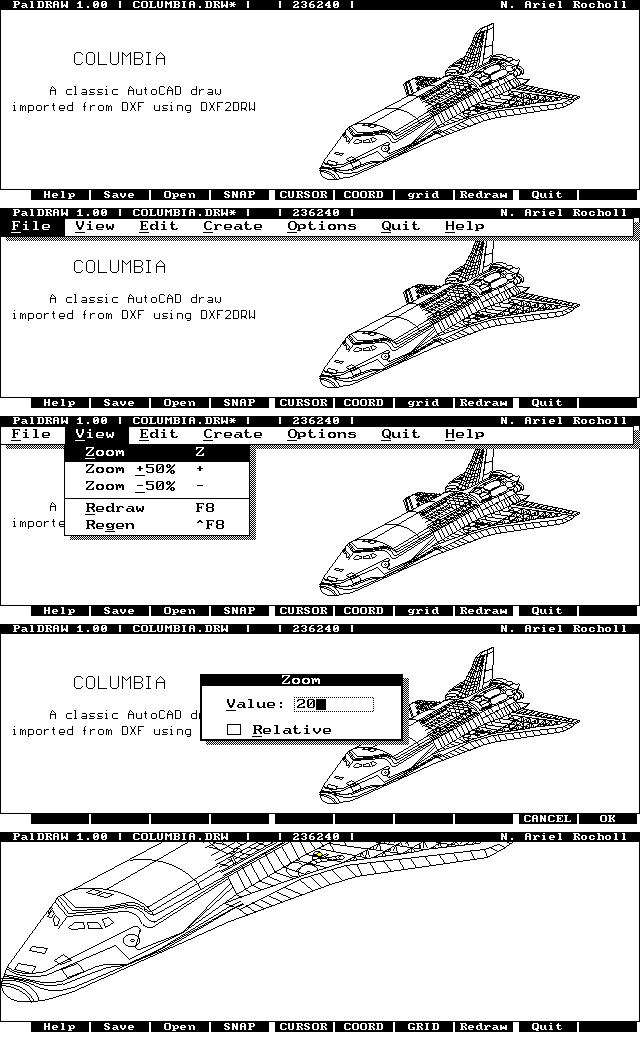
Description
PalDRAW is a Draw/CAD application specifically designed to work in HP 100/200LX palmtops. PalDRAW gives to the user an effective tool for drawing sketches on the fly, schematics, and serious final designs. Supports DXF file format and BMP & ICN. Visit the PalDRAW Homepage to check for newer versions. PalDRAW is now Freeware.
Technical details
- File
paldr103.zip- Size
- 353.2 KB
- Format
- .zip
- Year
- 2004
- Added to S.U.P.E.R.
- 2004-06-29
- Files inside
- 13
- Author
- Ariel Rocholl
- Path
anonftp/pub/paldr103.zip
How to install it
What to send to the palmtop saves 358.3 KB
These are the files you need. You can send them from the package contents below.
-
DRW2DXF.EXE→ A:\SOFT programa de DOS 27.9 KB -
DXF2DRW.EXE→ A:\SOFT programa de DOS 30.8 KB
No need to put
Extras.zip, faq.txt, FILE_ID.DIZ, Install.txt, LICENSE.DOC, MANUAL.RTF, Manual.txt, PalDRAW.txt and 3 more:
they are manuals, source code or supporting material. Read them here and save 358.3 KB on a 1 MB disk.
Steps
- Copy DRW2DXF.EXE, DXF2DRW.EXE to A:\SOFT. They are DOS programs: run them from the DOS icon, or add A:\SOFT to the PATH in C:\AUTOEXEC.BAT to call them by name.
Derived from the package contents and the 200LX conventions. It installs to A: on purpose: C: is a RAM disk and every byte there is memory taken from the system.
The author's instructions
Quick Start and Installation for new users

If you want to start working with PalDRAW right now, see the
installation notes in the MANUAL.RTF (TXT), then load PalDRAW
in your palmtop. Take a look at the examples given to see some
of the power of PalDRAW.  We've even provided a copy of the
famous AutoCAD drawing of the space shuttle Columbia.
As you open it note how quickly it appears on the screen even
without a math co-processor! You have another sample files in
C:\PD\DRAWS directory, including a BMP file. Delete them if you
want to save disk space, but see them to know some of the
PalDRAW power.

Quick Start and Installation for users of version 1.00

If you have installed the version 1.00, you can copy the new PD.EXE file
(contained in the PD.ZIP file inside the main ZIP file) over the PD.EXE of the
version 1.00 in your palmtop. No other changes are necessary in your palmtop configuration,
except in what you will probably be interested on browse the EXTRAS.ZIP file.

PalDRAW Viewer for Windows

We are developing a PalDRAW viewer to import/export DRW files in your PC under Windows,
and Print or copy/paste to other applications. This is in a beta phase, so visit our
web site soon.

Manual

Please note two different files (MANUAL.TXT and MANUAL.RTF)
have been included to assist you in getting most from your use
of PalDRAW. Both files contain the same information with the
only difference being the file format. MANUAL.RTF is provided
in Microsoft Windows RTF format. Use this format to read the
manual in Microsoft Windows (Using Wordpad).
Read MANUAL.TXT for quick reference in your HP palmtop PC
or in MS-DOS in your PC.

DXF Support

You will see information in MANUAL.RTF (TXT) explaining
DXF<->DRW conversion process.  If you are importing a DXF
…
Literal excerpt from README.DOC, exactly as it came in the package.
Package contents
Send to my palmtop
The palmtop must be waiting before you press the button, or the transfer will fail. It is the palmtop that announces it is ready, not the other way round.
Your browser cannot talk to the serial port. Direct sending uses the Web Serial API, which only exists in Chrome, Edge and Opera on desktop — not in Firefox, Safari or any mobile browser.
Download the file with the button above and copy it to the palmtop your usual way.