
PAL Date Dialog Item
Version 1.0 · John McDonald
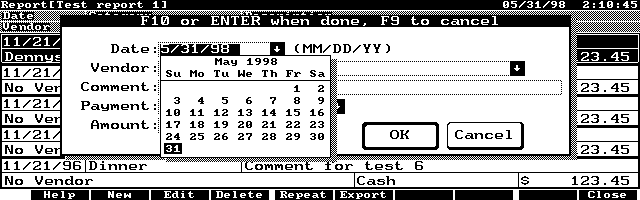
Description
PALDate contains source code for adding a date item to the dialog capabilities of PAL. The date item consists of an 11 character edit field that will allow a user to enter a date. By pressing the down arrow, the date can be selected from a calendar display. Freeware.
Technical details
- File
paldate.zip- Size
- 16.7 KB
- Format
- .zip
- Year
- 1998
- Added to S.U.P.E.R.
- 1998-05-29
- Files inside
- 6
- Author
- John McDonald
- Path
anonftp/pub/paldate.zip
How to install it
What to send to the palmtop saves 62.9 KB
No need to put
DATE.TXT, DHSTNDRD.C, IHDATE.C, PALDLG.H, SRCLIST, README.TXT:
they are manuals, source code or supporting material. Read them here and save 62.9 KB on a 1 MB disk.
Steps
- This package has no recognisable executables. Download it and look at its contents: it may be documentation, source code or supporting material.
Derived from the package contents and the 200LX conventions. It installs to A: on purpose: C: is a RAM disk and every byte there is memory taken from the system.
The author's instructions
To install the date item, you must copy the files
into their appropriate directories and re-build
PAL. It is recommended that you save copies
of the original files before replacing them.
The following tables shows where each file goes:

File		Location
DHSTNDRD.C	\PAL\SRC\DIALOG
IHDATE.C	\PAL\SRC\DIALOG
PALDLG.H	\PAL\SRC\INC
SRCLIST		\PAL\SRC
DATE.TXT	\PAL\DOCS


Note: You can edit the standard doc files
(\PAL\SRC\DIALOG\DIALOG.DOC)
to include the contents of date.txt directly
if you wish to have all of your documentation
consolidated.

Once you have copied the files into the
correct directories, you must rebuild PAL.
This can be done as follows:

A:\> cd \PAL\SRC
A:\PAL\SRC> PM

Note: The above example assumes that your
PAL directory is on your A: drive.

Please note that the date item has only been
tested with Borland Turbo C v2.0 (since that's
the only compiler I have). However, all code
was written to conform to PAL standards and as
such, should work with any PAL supported
compiler.

If you have any questions on the date item,
please contact me at johnmcd@ix.netcom.com.
For any other PAL related issues, please contact
the PAL authors directly.

John McDonald
Literal excerpt from README.TXT, exactly as it came in the package.
Package contents
Send to my palmtop
The palmtop must be waiting before you press the button, or the transfer will fail. It is the palmtop that announces it is ready, not the other way round.
Your browser cannot talk to the serial port. Direct sending uses the Web Serial API, which only exists in Chrome, Edge and Opera on desktop — not in Firefox, Safari or any mobile browser.
Download the file with the button above and copy it to the palmtop your usual way.