
BlackJack
Version 1.2 · Curtis Cameron
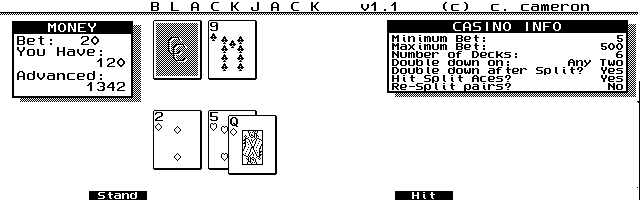
Description
Blackjack (or 21) for the HP 100/200LX. Copyrighted freeware. Check for a more recent version on C. Cameron's homepage
Technical details
- File
bj.zip- Size
- 16.7 KB
- Format
- .zip
- Year
- 1996
- Added to S.U.P.E.R.
- 1997-01-06
- Files inside
- 3
- Author
- Curtis Cameron
- Path
anonftp/pub/bj.zip
How to install it
What to send to the palmtop saves 7.7 KB
These are the files you need. You can send them from the package contents below.
-
BJ.ICN→ A:\SOFT icono, junto a su aplicación 200 B -
BJ.EXE→ A:\SOFT programa de DOS 26.3 KB
No need to put
BJ.DOC:
they are manuals, source code or supporting material. Read them here and save 7.7 KB on a 1 MB disk.
Steps
- Copy BJ.EXE to A:\SOFT. They are DOS programs: run them from the DOS icon, or add A:\SOFT to the PATH in C:\AUTOEXEC.BAT to call them by name.
- The .ICN files are icons: they go in the same folder as their application.
Derived from the package contents and the 200LX conventions. It installs to A: on purpose: C: is a RAM disk and every byte there is memory taken from the system.
The author's instructions
--------- Installing the game in the Palmtop:

This game is a DOS program, and is not "System Manager Compliant." You
can run only one DOS program at a time in the Palmtop, but it will work
fine running at the same time as any System Manager Compliant programs
such as the built-in applications. When the game is running, you can
quickly get to a built-in app by hitting its blue/green key. Get back
to the game by hitting Ctrl-123, which is the standard key combination
for getting to DOS.

Copy the files BJ.EXE and BJ.ICN to either your C: disk or your A:
disk (if you have a flash card). You may want to make a sub-directory
called GAMES, and put them in there. Hit the blue/green More key to get
to the Palmtop's App Manager, then hit F2 to add a new item.

In the Name field, put the name you would like, such as "Black &Jack" -
this will make it so you can start the program by going to App Manager
and just hitting "J". In the Path field, put the path where you put the
program, then the file name, then "|50", such as this:

Path:  c:\games\bj.exe|50

The "|" character is typed by hitting shift-backslash, and the 50 means
to give the program 50 kbytes of memory to run. If you leave off this
part, the program will still work but will use more memory that it
really needs to, leaving you less for your other running applications.

In the Comments field, you can put and upside-down question mark by
hitting Fn-3 and you won't see the message telling you to Press any key
to exit from DOS.

Then hit Tab to go to the Icon field, and you should see the game's icon
appear. Now hit F10 to save the info, and you're done.

-------- Blackjack rules:

Blackjack is a casino game where you try to win money by getting closer
…
Literal excerpt from BJ.DOC, exactly as it came in the package.
Package contents
Send to my palmtop
The palmtop must be waiting before you press the button, or the transfer will fail. It is the palmtop that announces it is ready, not the other way round.
Your browser cannot talk to the serial port. Direct sending uses the Web Serial API, which only exists in Chrome, Edge and Opera on desktop — not in Firefox, Safari or any mobile browser.
Download the file with the button above and copy it to the palmtop your usual way.