
XWORD
Version 2.0 · Jim Gasbarro
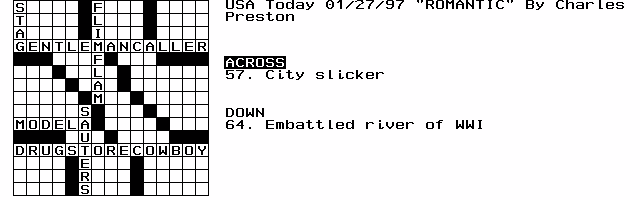
Description
XWORD is a slick, little crossword puzzle player for the HP 100/200LX. New to Version 2.0 is the ability to play puzzles in the AcrossLite format used by the New York Times. USAToday format puzzles are still supported as well. Postcardware.
Technical details
- File
xword20.zip- Size
- 26.0 KB
- Format
- .zip
- Year
- 1997
- Added to S.U.P.E.R.
- 1997-02-24
- Files inside
- 4
- Author
- Jim Gasbarro
- Path
anonftp/pub/xword20.zip
How to install it
What to send to the palmtop saves 9.5 KB
These are the files you need. You can send them from the package contents below.
-
XWORD.EXE→ A:\SOFT programa de DOS 37.8 KB -
XWORD.ICN→ A:\SOFT icono, junto a su aplicación 200 B
No need to put
SAMPLE.PUZ, XWORD.DOC:
they are manuals, source code or supporting material. Read them here and save 9.5 KB on a 1 MB disk.
Steps
- Copy XWORD.EXE to A:\SOFT. They are DOS programs: run them from the DOS icon, or add A:\SOFT to the PATH in C:\AUTOEXEC.BAT to call them by name.
- The .ICN files are icons: they go in the same folder as their application.
Derived from the package contents and the 200LX conventions. It installs to A: on purpose: C: is a RAM disk and every byte there is memory taken from the system.
The author's instructions
Installation

Unzip the archive using pkunzip.  You can put the files in any
directory and on any disk, but the .exe and .icn files must stay
together.  The directory where the .exe resides will be the one
initially pointed to by the "File Open" utility, so for convenience,
this is probably where you will want to put your .puz game files as
well.

To install Xword in the Application Manager, go to the Application
Manager and press F2 (Add).  Fill in the fields as follows:

Name: Cr&oss Word		(I use 'o' for the hotkey)
Path: a:\xword\xword.exe	(change this to reflect your disk:\path)
Comments: Fn-?			(press Function-? to get the
				upside-down question mark)

If you TAB to the Icon window the Xword icon should appear.
Press F10 (OK).

xword.exe takes a command line argument, so you can also start
Xword from DOS by typing for example:

xword sample.puz

You can also start the program directly from the Filer by adding
the following entry to your C:\_DAT\FILER.INI file:

[Launcher]
puz=c:\xword\xword.exe %

Then just highlight a .puz file in Filer and hit Enter.


User Guide

Start Xword in whatever manner you prefer.  Upon startup, you will see
a blank playing field.  To load a game in either Across Lite (NYTimes)
or USAToday format, press Menu | File | Open and select the desired
puzzle (e.g. sample.puz).  The puzzle will load and you will see the
blinking cursor in the upper-left corner, the crossword's title, and
the Across and Down clues.

Cursor movement is done using the arrow keys, which move the cursor a box
at a time, and the Fn-arrow keys, which move the cursor a word at a
time.  The Enter key advances to the beginning of the next line.

For type-in, you can choose any key A through Z and 0 through 9.  All
…
Literal excerpt from XWORD.DOC, exactly as it came in the package.
Package contents
Send to my palmtop
The palmtop must be waiting before you press the button, or the transfer will fail. It is the palmtop that announces it is ready, not the other way round.
Your browser cannot talk to the serial port. Direct sending uses the Web Serial API, which only exists in Chrome, Edge and Opera on desktop — not in Firefox, Safari or any mobile browser.
Download the file with the button above and copy it to the palmtop your usual way.