
XWORD
Versión 2.0 · Jim Gasbarro
Descripción
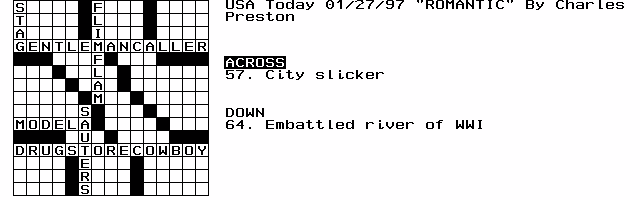
XWORD is a slick, little crossword puzzle player for the HP 100/200LX. New to Version 2.0 is the ability to play puzzles in the AcrossLite format used by the New York Times. USAToday format puzzles are still supported as well. Postcardware.
Ficha técnica
- Fichero
xword20.zip- Tamaño
- 26.0 KB
- Formato
- .zip
- Año
- 1997
- Alta en S.U.P.E.R.
- 1997-02-24
- Ficheros dentro
- 4
- Autor
- Jim Gasbarro
- Ruta
anonftp/pub/xword20.zip
Cómo instalarlo
Qué enviar al palmtop ahorras 9.5 KB
Estos son los ficheros que necesitas. Puedes enviarlos desde el contenido del paquete.
-
XWORD.EXE→ A:\SOFT programa de DOS 37.8 KB -
XWORD.ICN→ A:\SOFT icono, junto a su aplicación 200 B
No hace falta llevar al palmtop
SAMPLE.PUZ, XWORD.DOC:
son manuales, código fuente o material de apoyo. Léelos aquí y ahórrate 9.5 KB en un disco de 1 MB.
Pasos
- Copia XWORD.EXE a A:\SOFT. Son programas de DOS: se ejecutan desde el icono DOS, o añadiendo A:\SOFT al PATH de C:\AUTOEXEC.BAT para poder llamarlos por su nombre.
- Los .ICN son iconos: van en la misma carpeta que su aplicación.
Deducido del contenido del paquete y de las convenciones del 200LX. Se instala en A: a propósito: C: es un disco RAM y cada byte ahí resta memoria al sistema.
Instrucciones del autor
Installation

Unzip the archive using pkunzip.  You can put the files in any
directory and on any disk, but the .exe and .icn files must stay
together.  The directory where the .exe resides will be the one
initially pointed to by the "File Open" utility, so for convenience,
this is probably where you will want to put your .puz game files as
well.

To install Xword in the Application Manager, go to the Application
Manager and press F2 (Add).  Fill in the fields as follows:

Name: Cr&oss Word		(I use 'o' for the hotkey)
Path: a:\xword\xword.exe	(change this to reflect your disk:\path)
Comments: Fn-?			(press Function-? to get the
				upside-down question mark)

If you TAB to the Icon window the Xword icon should appear.
Press F10 (OK).

xword.exe takes a command line argument, so you can also start
Xword from DOS by typing for example:

xword sample.puz

You can also start the program directly from the Filer by adding
the following entry to your C:\_DAT\FILER.INI file:

[Launcher]
puz=c:\xword\xword.exe %

Then just highlight a .puz file in Filer and hit Enter.


User Guide

Start Xword in whatever manner you prefer.  Upon startup, you will see
a blank playing field.  To load a game in either Across Lite (NYTimes)
or USAToday format, press Menu | File | Open and select the desired
puzzle (e.g. sample.puz).  The puzzle will load and you will see the
blinking cursor in the upper-left corner, the crossword's title, and
the Across and Down clues.

Cursor movement is done using the arrow keys, which move the cursor a box
at a time, and the Fn-arrow keys, which move the cursor a word at a
time.  The Enter key advances to the beginning of the next line.

For type-in, you can choose any key A through Z and 0 through 9.  All
…
Extracto literal de XWORD.DOC, tal cual venía en el paquete.
Contenido del paquete
Enviar a mi palmtop
El palmtop tiene que quedar esperando antes de pulsar el botón, o la transferencia fallará. Es él quien avisa de que está listo, no al revés.
Tu navegador no puede hablar con el puerto serie. El envío directo usa la Web Serial API, que solo existe en Chrome, Edge y Opera de escritorio — no en Firefox, Safari ni en ningún navegador móvil.
Descarga el fichero con el botón de arriba y pásalo al palmtop con tu método habitual.