
LUNGA
Versión 1.02 · Gregor Cdeilinik
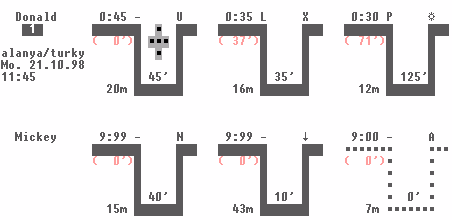
Descripción
Lunga is a computerized logbook for SCUBA divers written especially for the HPLX, but will run on any computer that will display CGA. Lunga is for dives within no-decompression limits and is able to calculate residual nitrogen times and pressure groups. Postcardware.
Ficha técnica
- Fichero
lunga.zip- Tamaño
- 24.9 KB
- Formato
- .zip
- Año
- 1999
- Alta en S.U.P.E.R.
- 1999-07-12
- Ficheros dentro
- 12
- Autor
- Gregor Cdeilinik
- Ruta
anonftp/pub/lunga.zip
Cómo instalarlo
Qué enviar al palmtop ahorras 29.3 KB
Estos son los ficheros que necesitas. Puedes enviarlos desde el contenido del paquete.
-
DONALD.DAT→ A:\_DAT configuración 601 B -
MICKEY.DAT→ A:\_DAT configuración 416 B -
LUNGA.CFG→ A:\_DAT configuración 56 B -
LUNGA.EXE→ A:\SOFT programa de DOS 26.2 KB
No hace falta llevar al palmtop
PADI1.TAB, PADI2.TAB, PADI3.TAB, SSI1.TAB, SSI2.TAB, SSI3.TAB, DOCU.TXT, DOCU200.TXT:
son manuales, código fuente o material de apoyo. Léelos aquí y ahórrate 29.3 KB en un disco de 1 MB.
Pasos
- Copia LUNGA.EXE a A:\SOFT. Son programas de DOS: se ejecutan desde el icono DOS, o añadiendo A:\SOFT al PATH de C:\AUTOEXEC.BAT para poder llamarlos por su nombre.
- Copia DONALD.DAT, MICKEY.DAT, LUNGA.CFG a A:\_DAT, que es donde el 200LX busca la configuración. Ábrelo con Memo y ajústalo antes de usarlo.
- Si editas un fichero de configuración en el palmtop, asegúrate de dejar un salto de línea al final: hay programas que se comen la última línea sin avisar.
Deducido del contenido del paquete y de las convenciones del 200LX. Se instala en A: a propósito: C: es un disco RAM y cada byte ahí resta memoria al sistema.
Instrucciones del autor
Installation
Just copy the files of this package to the same directory.
type 'LUNGA' from the ms-dos command line to start the program.

Using the program
You should already know how to document a dive (and understand
expressions like 'surfac interval', 'residual nitrogen time' or
'actual bottom time'). The program is intuitiv/self-explaining
(at least this was my aim). A simple online help is available
by pressing 'F1' (='HELP' on HP-LX palmtop computer).

Adding/removing divers, using tables
The names of the divers are given by the configuration file
'lunga.cfg'. Example files for divers 'Donald' and 'Mickey'
are included in this package.
Use a text editor to change the divers names in 'lunga.cfg'.
In that file each diver is define by a line 'DIVER: ###'
where '###' is the diver's name (maximum length 8 characters,
only letters or digits, no space (' ') allowed).
The number of divers in not
limited, but only the first two divers are shown in LUNGA.
The name of the dive table is also given in 'lunga.cfg'.
That file must begin with 'TABLE: ###', where '###' is the
table name. At the moment only 'PADI' and 'SSI' are supported.

Dive tables
The data used in LUNGA is compatibel to the the tables used
at PADI/SSI.
What does LUNGA do if the limits of this tables are exceeded:
I. if depth-limit exceeded: instead of a pressure group
   the sign '' is shown. If there is residual nitrogen
   from the last dive, a residual nitrogen time 999'
   is used. The calculation for the next dive is based
   on pressure group 'Z'.

I. if the total bottom time is exceeded: instead of a pressure
   group the symbol '' is shown. The calculation for the
   next dive is based on pressure group 'Z'.

I. if surface-interval is to short for a new dive: a residual
   nitrogen time 999' is used.

…
Extracto literal de DOCU.TXT, tal cual venía en el paquete.
Contenido del paquete
Enviar a mi palmtop
El palmtop tiene que quedar esperando antes de pulsar el botón, o la transferencia fallará. Es él quien avisa de que está listo, no al revés.
Tu navegador no puede hablar con el puerto serie. El envío directo usa la Web Serial API, que solo existe en Chrome, Edge y Opera de escritorio — no en Firefox, Safari ni en ningún navegador móvil.
Descarga el fichero con el botón de arriba y pásalo al palmtop con tu método habitual.