
Backgammon
Versión 5.XX · Willy Chaplin
Descripción
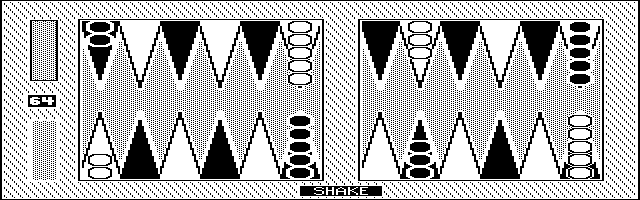
This is a backgammon game with teeth (very hard to beat) that runs well on the 200LX. It was originally written for the Commodore PET in 1979 and has been steadily improved since then. Copyrighted freeware.
Ficha técnica
- Fichero
backgamm.zip- Tamaño
- 79.1 KB
- Formato
- .zip
- Año
- 1998
- Alta en S.U.P.E.R.
- 1998-09-25
- Ficheros dentro
- 7
- Autor
- Willy Chaplin
- Ruta
anonftp/pub/backgamm.zip
Cómo instalarlo
Qué enviar al palmtop ahorras 45.8 KB
Estos son los ficheros que necesitas. Puedes enviarlos desde el contenido del paquete.
-
INSTALL.BAT→ A:\SOFT programa de DOS 190 B -
BG1991.EXE→ A:\SOFT programa de DOS 73.3 KB -
BG1992.EXE→ A:\SOFT programa de DOS 221.0 KB
No hace falta llevar al palmtop
README, BACKGAMM.TXT, AUTHOR.TXT, permiss.txt:
son manuales, código fuente o material de apoyo. Léelos aquí y ahórrate 45.8 KB en un disco de 1 MB.
Pasos
- Copia INSTALL.BAT, BG1991.EXE, BG1992.EXE a A:\SOFT. Son programas de DOS: se ejecutan desde el icono DOS, o añadiendo A:\SOFT al PATH de C:\AUTOEXEC.BAT para poder llamarlos por su nombre.
Deducido del contenido del paquete y de las convenciones del 200LX. Se instala en A: a propósito: C: es un disco RAM y cada byte ahí resta memoria al sistema.
Instrucciones del autor
Setup a Position

After hitting <Ctrl S> and the board has cleared, use the '<' and '>' keys
to move the cursor around the screen.  Note that the cursor will visit all
points, including the bar at BOTH ends of the screen.

To insert pieces on an empty point, cursor to that point and then hit <C>
or <P> plus a digit from 1 to 9 to indicate whose pieces and how many to
place on that point.

To delete pieces on a point, cursor to that point and the press the <Del>
key.  These pieces will return to their holder.

The computer will not allow you to make illegal placements (such as putting
the computer's pieces on the player's bar).

Once you have completed your setup, hit <Enter>.  You will be asked "OK?" and
if you sanction it by hitting <Y>, the final question is which side to move
first.  Hit <C> for computer and <P> for player (you).

If you have trouble deciding which color belongs to whom, remember that yours
are in the piece holder at the bottom of the screen.  Also, your home quadrant
(the computer's bearing off quadrant) is always numbered 1 to 6.

Note that if you enter setup during a game, you will lose that game and can
only save or replay moves from the point of the setup.


			Saving/Restoring Games

At the end of each game, you are asked if you wish to save it.  Only the <Y>
key will start the saving process.  Any other key will proceed.  if you do
answer <Y>, the board will clear away and you will be presented with a menu.
You can also hit <Ctrl W> at any time to get to this menu.

You can save or restore any fragment of any game in this fashion.  You must
give each saved fragment a name, after which it will be written to disk.  The
number of games you can save is limited only by disk space.

…
Extracto literal de BACKGAMM.TXT, tal cual venía en el paquete.
Contenido del paquete
Enviar a mi palmtop
El palmtop tiene que quedar esperando antes de pulsar el botón, o la transferencia fallará. Es él quien avisa de que está listo, no al revés.
Tu navegador no puede hablar con el puerto serie. El envío directo usa la Web Serial API, que solo existe en Chrome, Edge y Opera de escritorio — no en Firefox, Safari ni en ningún navegador móvil.
Descarga el fichero con el botón de arriba y pásalo al palmtop con tu método habitual.