
HPMILE
Version 4.4 · Mark Boughen
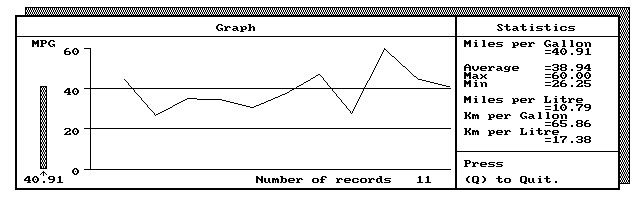
Description
HPMILE is a DOS program for recording and graphing your car's gasoline mileage on the HP 100/200LX. New version allows entry in gallons or liters. Copyrighted freeware.
Technical details
- File
hpmile44.zip- Size
- 40.3 KB
- Format
- .zip
- Year
- 1998
- Added to S.U.P.E.R.
- 2004-06-27
- Files inside
- 5
- Author
- Mark Boughen
- Path
anonftp/pub/hpmile44.zip
How to install it
What to send to the palmtop saves 8.0 KB
These are the files you need. You can send them from the package contents below.
-
HPMILE.EXE→ A:\SOFT programa de DOS 37.2 KB -
HPMILE.ICN→ A:\SOFT icono, junto a su aplicación 200 B
No need to put
HPMILE.PCX, HPMILE.TXT, INFO.TXT:
they are manuals, source code or supporting material. Read them here and save 8.0 KB on a 1 MB disk.
Steps
- Copy HPMILE.EXE to A:\SOFT. They are DOS programs: run them from the DOS icon, or add A:\SOFT to the PATH in C:\AUTOEXEC.BAT to call them by name.
- The .ICN files are icons: they go in the same folder as their application.
Derived from the package contents and the 200LX conventions. It installs to A: on purpose: C: is a RAM disk and every byte there is memory taken from the system.
The author's instructions
When installing HP Mileage in the applications manager type
type the following at the path prompt:

c:\(directory)\hpmile.exe|

This will assign all available memory to the application.

You will notice upon first entering data that the graph does not show any information, this is because the horizontal scale of the graph is divided by the number of records.  As you will have entered only one record it will not be shown on the graph.

As you enter more and more records, the space devoted to each record set will decrease and you will see an extensive history of your car's performance.

When the program calculates your mpg it adds the new value, as well as the date to a file called "mileage.dat".  HP Mileage Shows a graph of the mileage performance, but if you want to access the date information the "mileage.dat" file can either be opened in the memo editor or imported into Lotus 1-2-3.

**You can view or print the file, but DO NOT modify the file**

When the graph shown in HP Mileage becomes too dense, at around 300 data sets, you can start a new graph by deleting the "mileage.dat" file.

If you have any questions or comments about HP Mileage 4.2,
or if you would like to make a donation to aid the production of future applications for the HP palmtop, please write to:

Mark Boughen
c/o 2 Fulmerston Road,
Thetford,
Norfolk,
England'
IP24 3BG.

I hope you enjoy using this software.
Literal excerpt from HPMILE.TXT, exactly as it came in the package.
Package contents
Send to my palmtop
The palmtop must be waiting before you press the button, or the transfer will fail. It is the palmtop that announces it is ready, not the other way round.
Your browser cannot talk to the serial port. Direct sending uses the Web Serial API, which only exists in Chrome, Edge and Opera on desktop — not in Firefox, Safari or any mobile browser.
Download the file with the button above and copy it to the palmtop your usual way.