
DraftChoice
Version HP2.1f · Trius Inc
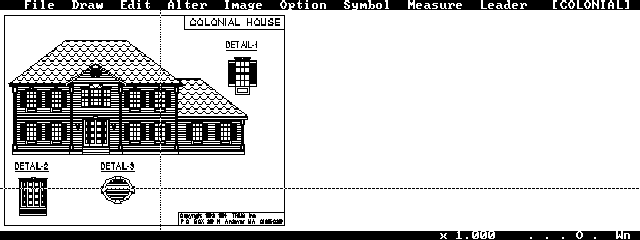
Description
One of the best CAD programs for the HP Palmtop. Shareware.
Technical details
- File
dchp.zip- Size
- 454.9 KB
- Format
- .zip
- Year
- 1996
- Added to S.U.P.E.R.
- 1996-11-11
- Files inside
- 10
- Author
- Trius Inc
- Path
anonftp/pub/dchp.zip
How to install it
What to send to the palmtop saves 329.4 KB
These are the files you need. You can send them from the package contents below.
-
INSTALL.EXE→ A:\SOFT programa de DOS 48.3 KB -
DC21U.EXE→ A:\SOFT programa de DOS 121.2 KB
No need to put
READ.ME, FILE_ID.DIZ, LICENSE.DOC, VENDOR.DOC, DC21U.DOC, DC21.FLS, AGENT.DOC, ORDER.DOC:
they are manuals, source code or supporting material. Read them here and save 329.4 KB on a 1 MB disk.
Steps
- Copy INSTALL.EXE, DC21U.EXE to A:\SOFT. They are DOS programs: run them from the DOS icon, or add A:\SOFT to the PATH in C:\AUTOEXEC.BAT to call them by name.
Derived from the package contents and the 200LX conventions. It installs to A: on purpose: C: is a RAM disk and every byte there is memory taken from the system.
The author's instructions
GETTING STARTED
   The information provided below is to help you start the program for
   your hardware configuration.  For more details about the operation of
   the program press the F1 (function) key once you have started the
   program.

   Once installed (see below for installation procedure) DRAFT Choice is
   started from DOS using the command:

    C:> DC /Option1/Option2/Option3/.....     [ENTER]

   where Option1, Option2, etc.  are options specifying the type of
   memory to use, the type of graphics video adaptor, etc.  For a
   complete description of these options, please print and consult the
   on-disk user's manual.


   Ordering Information
   Remember that a shareware copy is an EVALUATION copy that you can use
   for up to 30 days.  If you continue to use the program, Registration
   is Required!  You may register using the order form in the ORDER.ME
   file, or by calling TRIUS, Inc. and charging your purchase on your
   credit card. We suggest that you call, since prices are subject to
   change without notice.

   You may also order your copy on-line by calling our TRIUS Support BBS
   at (508) 794-0762 [12/24/9600/14,400 - N,8,1  - 24 hrs].

   If you live outside the US and Canada you may want to contact TRIUS,
   Inc. for a dealer in your country.  Purchasing through these dealers
   can save you the delay and inconvenience which may be involved in
   dealing with currency conversions and international shipping and in
   many cases will provide you with faster technical support.


   Installation
   The recommended procedure for installing the program on the Palmtop is
   given below.  Note that if you obtained a shareware copy as a .ZIP
   file, you first need to PKUNZIP the file.
Literal excerpt from READ.ME, exactly as it came in the package.
Package contents
Send to my palmtop
The palmtop must be waiting before you press the button, or the transfer will fail. It is the palmtop that announces it is ready, not the other way round.
Your browser cannot talk to the serial port. Direct sending uses the Web Serial API, which only exists in Chrome, Edge and Opera on desktop — not in Firefox, Safari or any mobile browser.
Download the file with the button above and copy it to the palmtop your usual way.