
Analog Clock
Versión 1.0 · Wild West Software
Descripción
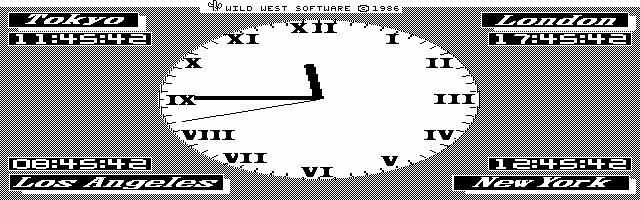
The HP Palmtop Paper Best Clock turns your Palmtop into a full screen analog clock with the times in four parts of the world displayed in the four corners of the screen. The program is freeware.
Ficha técnica
- Fichero
bestclk.zip- Tamaño
- 22.9 KB
- Formato
- .zip
- Año
- 1989
- Alta en S.U.P.E.R.
- 1998-12-20
- Ficheros dentro
- 2
- Autor
- Wild West Software
- Ruta
anonftp/pub/bestclk.zip
Cómo instalarlo
Qué enviar al palmtop ahorras 6.3 KB
Estos son los ficheros que necesitas. Puedes enviarlos desde el contenido del paquete.
-
CLOCK.COM→ A:\SOFT programa de DOS 40.8 KB
No hace falta llevar al palmtop
BESTMENU.DOC:
son manuales, código fuente o material de apoyo. Léelos aquí y ahórrate 6.3 KB en un disco de 1 MB.
Pasos
- Copia CLOCK.COM a A:\SOFT. Son programas de DOS: se ejecutan desde el icono DOS, o añadiendo A:\SOFT al PATH de C:\AUTOEXEC.BAT para poder llamarlos por su nombre.
Deducido del contenido del paquete y de las convenciones del 200LX. Se instala en A: a propósito: C: es un disco RAM y cada byte ahí resta memoria al sistema.
Instrucciones del autor
install  your  mouse,  tell  BestMenu about it and click your way
through your menu system.


* The World Time Clock....

As an extra touch, BestMenu will transform your  screen  into  an
analog  World  Time  Clock.    The times in four different cities
around the world are displayed in addition  to  the  local  time.
The  clock  will  pop up after you leave your keyboard unattended
for a few minutes.  The exact time lapse can be set by you.   Our
clock  brings life and purpose to computers momentarily not being
used.  The Clock can be turned off and in this case  your  screen
will automatically be blanked.


* The Wizard Of DOS....

Our user's manual actually comes in two volumes.  The first is  a
quick  but  detailed  explanation  of  all  BestMenu features and
utility programs, including a 25 page tutorial.  Volume Two is  a
rich  and intensive guide to the MS DOS operating system and hard
disk organization.  We believe it will do wonders  for  you.   We
call it - THE WIZARD OF DOS.  This set of books contains valuable
information, and goes far beyond telling how to use the  BestMenu
programs.


* Password Protection....

BestMenu comes with PASSWORD.EXE, a password utility program that
alows  you  to  set  who-runs-what  in  your  hard  disk  system.
PASSWORD is not memory resident and will never lock the system as
some  of the fancier password programs do.  PASSWORD is extremely
easy to use.


* And More....

There is  much  more  to  BestMenu.   A  Disk  Swapping  Utility,
Parallel  port  reassignment  and System Boot Utility, are only a
few of the many things that you get with BestMenu.


* System Requirements....

BestMenu will run on all IBM PC, XT, AT, PS/2 and true compatible
computers   using   PC-DOS  or  MS-DOS  2.0  and  above.   It  is
…
Extracto literal de BESTMENU.DOC, tal cual venía en el paquete.
Contenido del paquete
Enviar a mi palmtop
El palmtop tiene que quedar esperando antes de pulsar el botón, o la transferencia fallará. Es él quien avisa de que está listo, no al revés.
Tu navegador no puede hablar con el puerto serie. El envío directo usa la Web Serial API, que solo existe en Chrome, Edge y Opera de escritorio — no en Firefox, Safari ni en ningún navegador móvil.
Descarga el fichero con el botón de arriba y pásalo al palmtop con tu método habitual.